
Bank Transfer Top Up on LUCKYTOWN: Complete 9-Step Guide
LUCKYTOWN Bank Transfer Top Up -Fast and Secure Deposits
Introduction to LUCKYTOWN Bank Transfer Topup
The LUCKYTOWN bank transfer topup feature provides a secure and convenient way for members to add funds to their accounts. This comprehensive guide walks you through every step of the process, from accessing the deposit menu to uploading payment receipts. LUCKYTOWN PLUS members can complete bank transfer topups quickly and efficiently, with finance department processing typically completed within 10 minutes.
Step-by-Step Guide to LUCKYTOWN Bank Transfer Topup

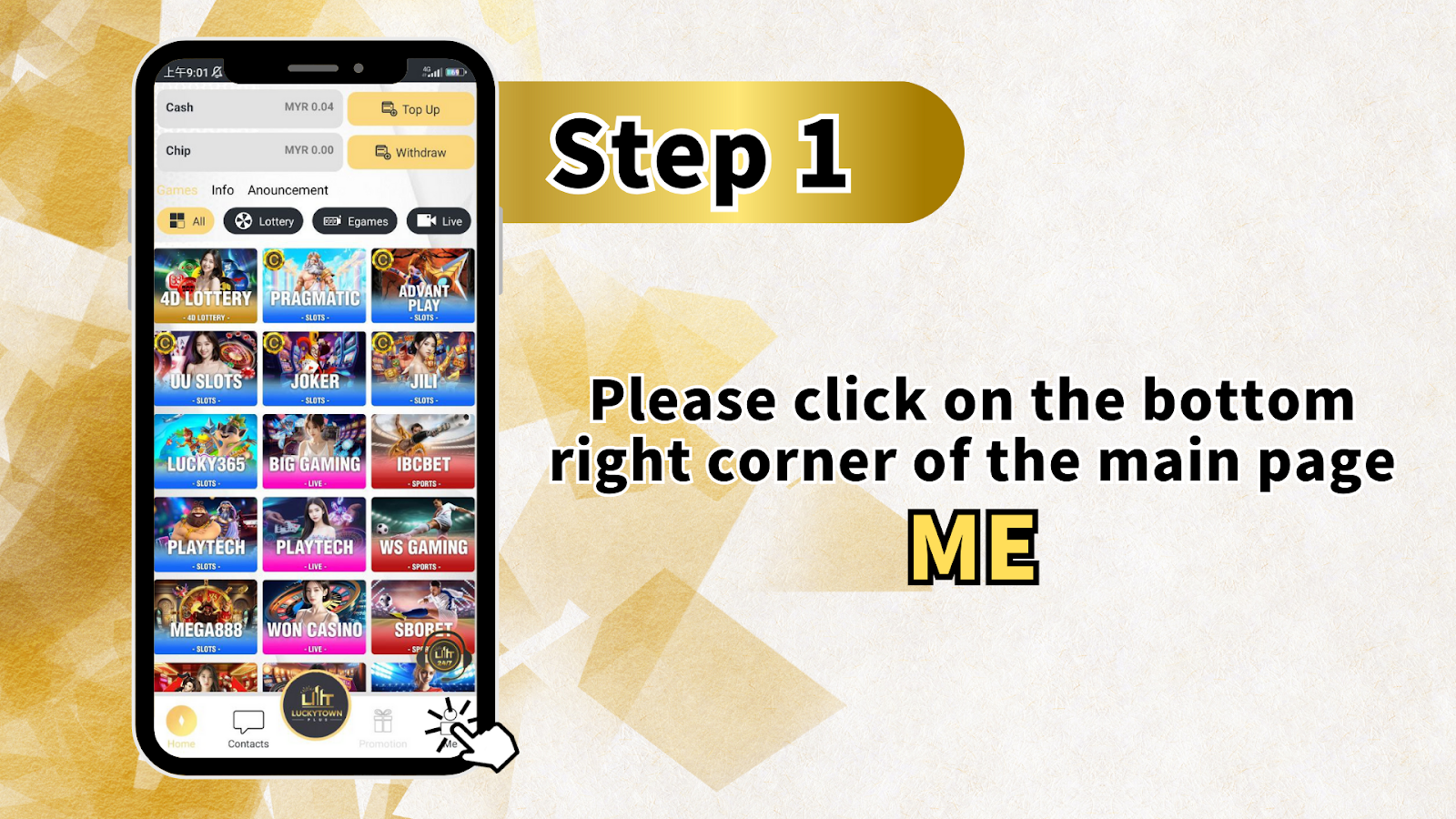
Step 1: Click on the Bottom Right Corner of the Main Page - ME
To begin your LUCKYTOWN bank transfer topup, navigate to the main page of your LUCKYTOWN PLUS account. Locate and click on the bottom right corner where you will find the "ME" section. This area contains all your account management options. The main page also displays your Cash balance, Chip balance, Games, Info, and Announcement sections along with prominent Top Up and Withdraw buttons for easy access. Below these, you'll see the complete game catalog including 4D LOTTERY, PRAGMATIC, ADVANT PLAY, LUCKY365, BIG GAMING, IBCBET, SPORTS, PLAY TECH, WS GAMING, MEGA888, WON CASINO, and SBOPET, all accessible once your LUCKYTOWN bank transfer topup is complete.
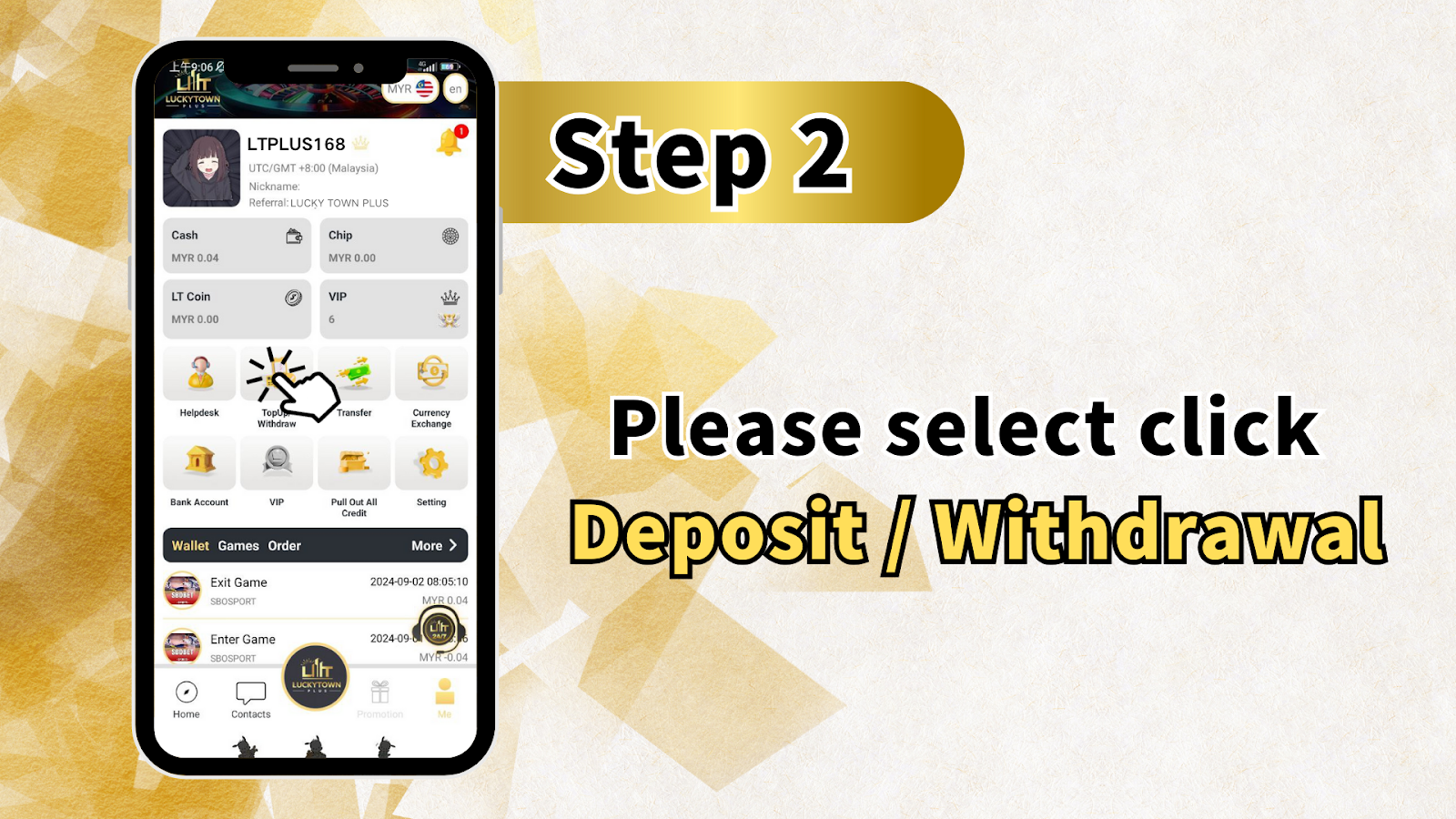
Step 2: Please Select Click Deposit / Withdrawal
After entering the ME section, locate and click on "Deposit / Withdrawal" to proceed with your LUCKYTOWN bank transfer topup. This option takes you to the financial transaction center where all deposits and withdrawals are managed for your LUCKYTOWN PLUS account.
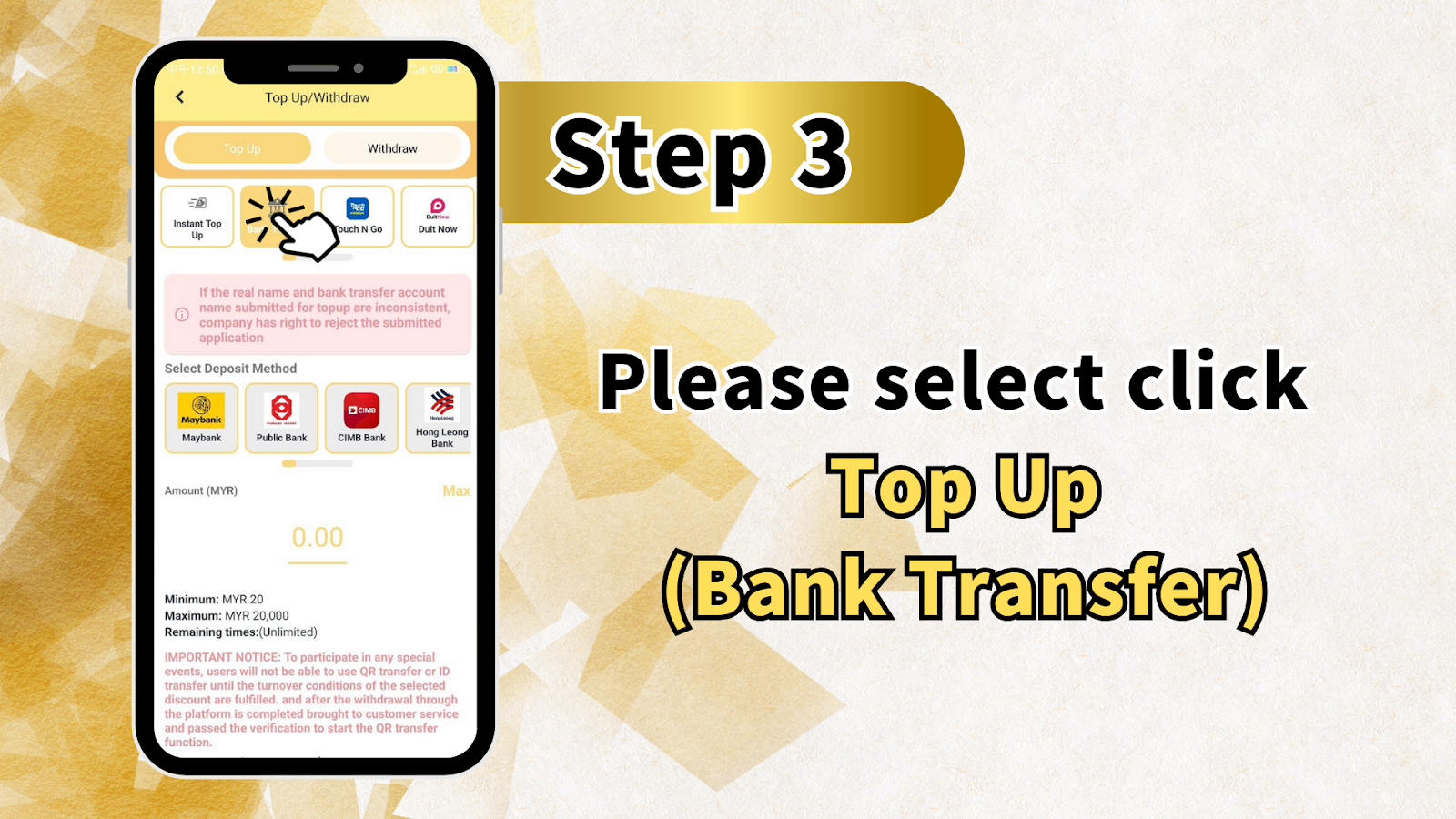
Step 3: Select Top Up (Bank Transfer)
On the Top Up/Withdraw screen, you will see two main options: Top Up and Withdraw. Select "Top Up" to begin your LUCKYTOWN bank transfer topup. Note the important warning: If the real name and bank transfer account name submitted for payment are inconsistent, the company has the right to reject the submitted application. Ensure your bank account name matches your LUCKYTOWN PLUS verified real name before proceeding.
Select Deposit Method
From the available bank options, choose your preferred deposit method for the LUCKYTOWN bank transfer topup. Available banks include:
- Maybank
- Public Bank
- CIMB Bank
- Hong Leong Bank
Enter Amount (MYR)
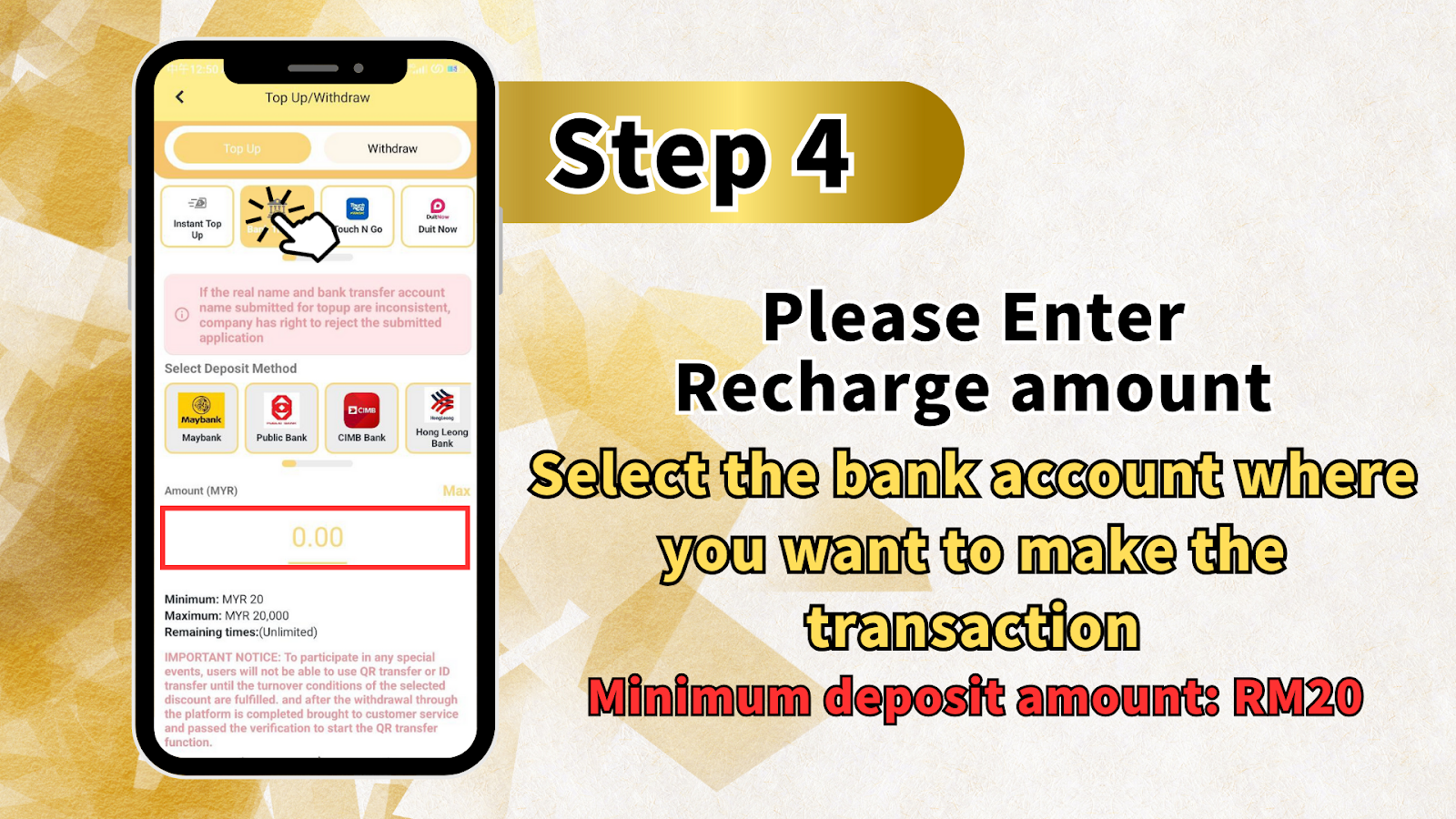
Enter the amount you wish to deposit for your LUCKYTOWN bank transfer topup. The amount field starts at 0.00 MYR. Minimum deposit: MYR 20. Maximum deposit: MYR 20,000. Remaining time for this transaction is Unlimited.
Important Notice About Special Events
To participate in any special events, users will not be able to use QR transfer or ID transfer until the turnover conditions of the selected discount are fulfilled, and after the withdrawal through the platform is completed, brought to customer service, and passed verification to start the QR transfer function. Keep this in mind when planning your LUCKYTOWN bank transfer topup in relation to promotions.
Click Top Up (Bank Transfer)
After selecting your bank and entering the amount, please select click "Top Up (Bank Transfer)" to proceed to the next stage of your LUCKYTOWN bank transfer topup.
Step 4: Enter Recharge Amount and Select Bank
On the next screen, please enter the recharge amount for your LUCKYTOWN bank transfer topup. Select the bank account where you want to make the transaction. Remember the minimum deposit amount is RM20. Double-check your entries before continuing.
Step 5: Review Fraud Prevention Information
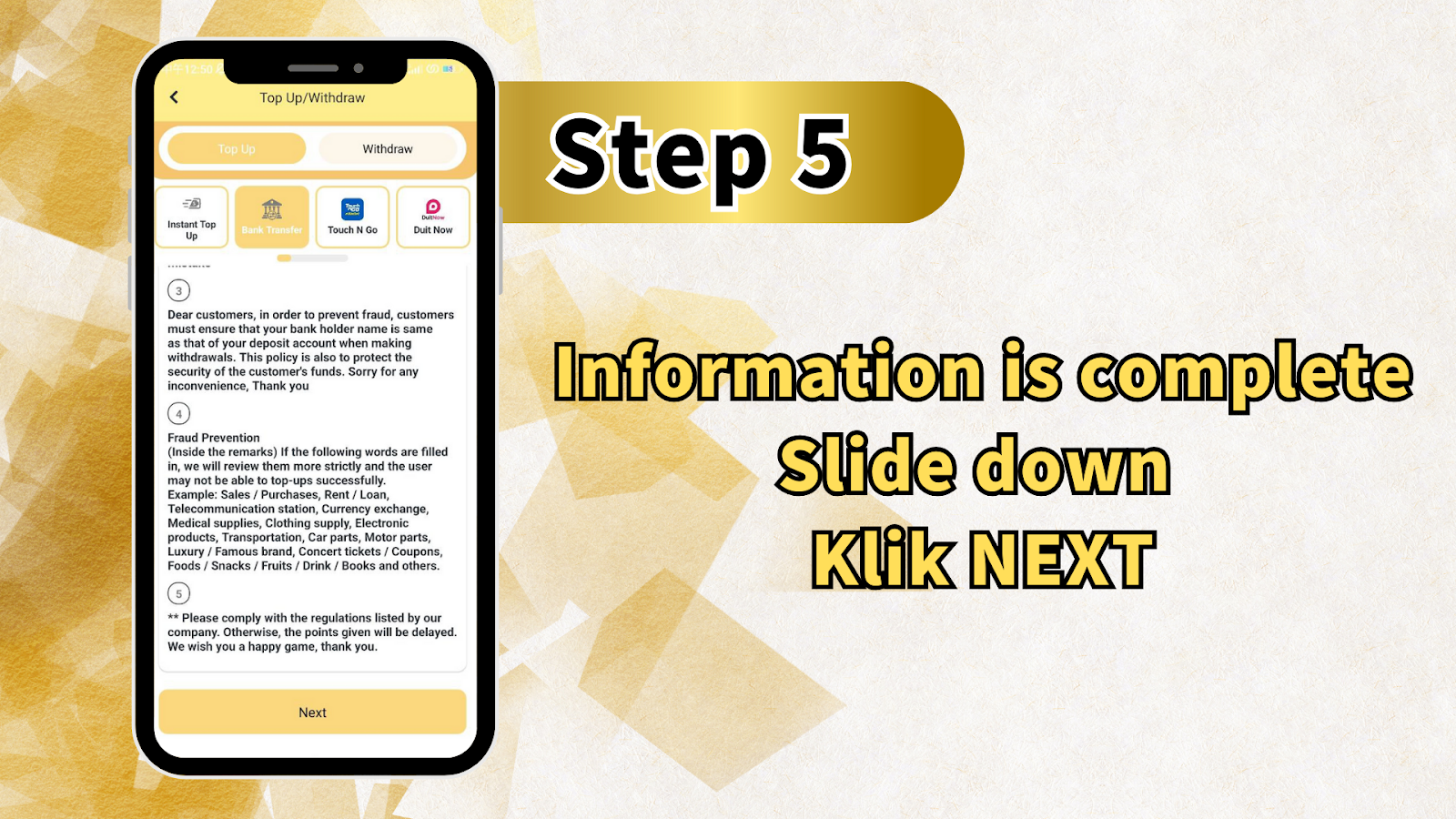
Before completing your LUCKYTOWN bank transfer topup, review the fraud prevention guidelines. Dear customers, in order to prevent fraud, customers must ensure that your bank holder name is the same as that of your deposit account when making withdrawals. This policy is also to protect the security of the customer's funds. Sorry for any inconvenience, thank you.
Fraud Prevention - Restricted Keywords
Inside the remarks section of your bank transfer, if the following words are filled in, LUCKYTOWN will review them more strictly and the user may not be able to top up successfully. Example restricted keywords: Sales / Purchases, Rent / Loan, Telecommunication station, Currency exchange, Medical supplies, Clothing supply, Electronic products, Transportation, Car parts, Motor parts, Luxury / Famous brand, Concert tickets / Coupons, Foods / Snacks / Fruits / Drink / Books and others. Please comply with the regulations listed by our company. Otherwise, the points given will be delayed. We wish you a happy game, thank you.
Complete Information and Click NEXT
After reviewing all fraud prevention information, ensure your information is complete, slide down, and klik NEXT to proceed with your LUCKYTOWN bank transfer topup.
Step 6: Copy Account Number and Transfer via Bank App
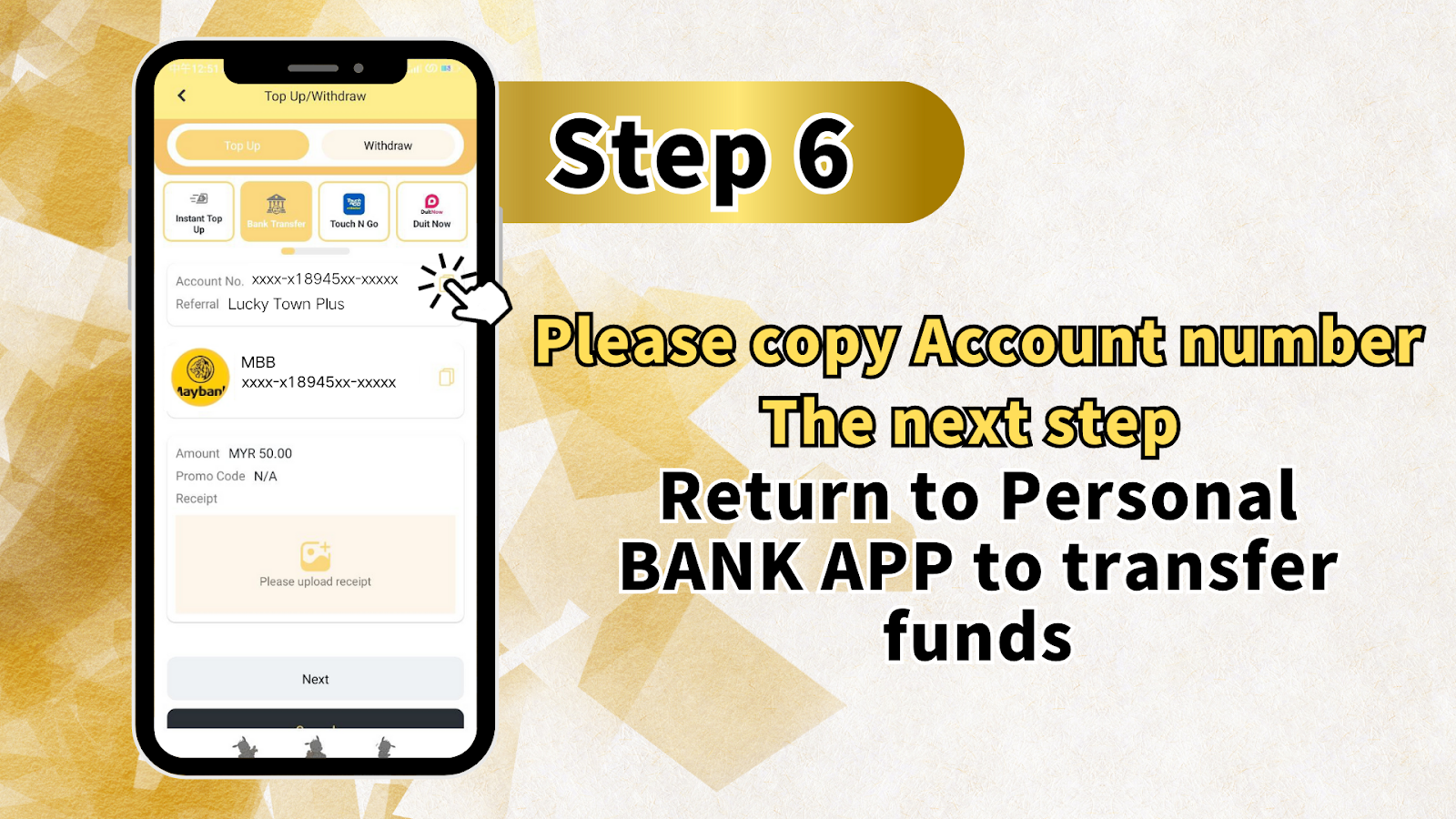
The next screen displays the LUCKYTOWN PLUS bank account details for your selected bank. You will see: Account No. xxxx-x18945xx-xxxxx and Reference: Lucky Town Plus. Please copy the account number, then open your bank app to transfer funds. After copying, you can proceed to the next step or return to personal section, but the primary action is to complete the transfer through your BANK APP.
Step 7: Recharge Complete - Upload Receipt
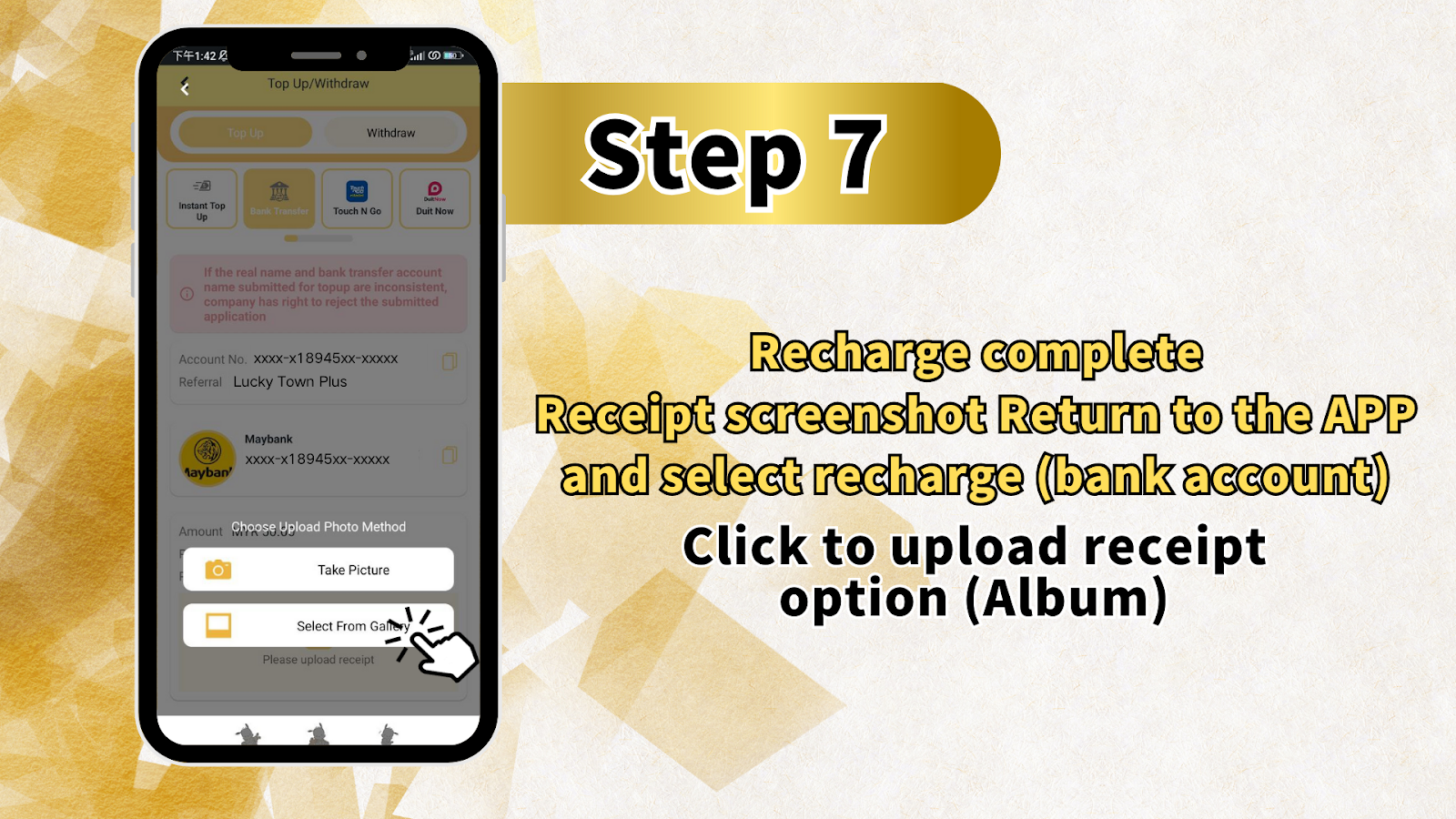
After completing the bank transfer, return to the LUCKYTOWN app. Select "Recharge (bank account)" and click the option to upload receipt from your album. Your LUCKYTOWN bank transfer topup requires this receipt upload for finance department verification.
Step 8: Confirm Receipt and Amount
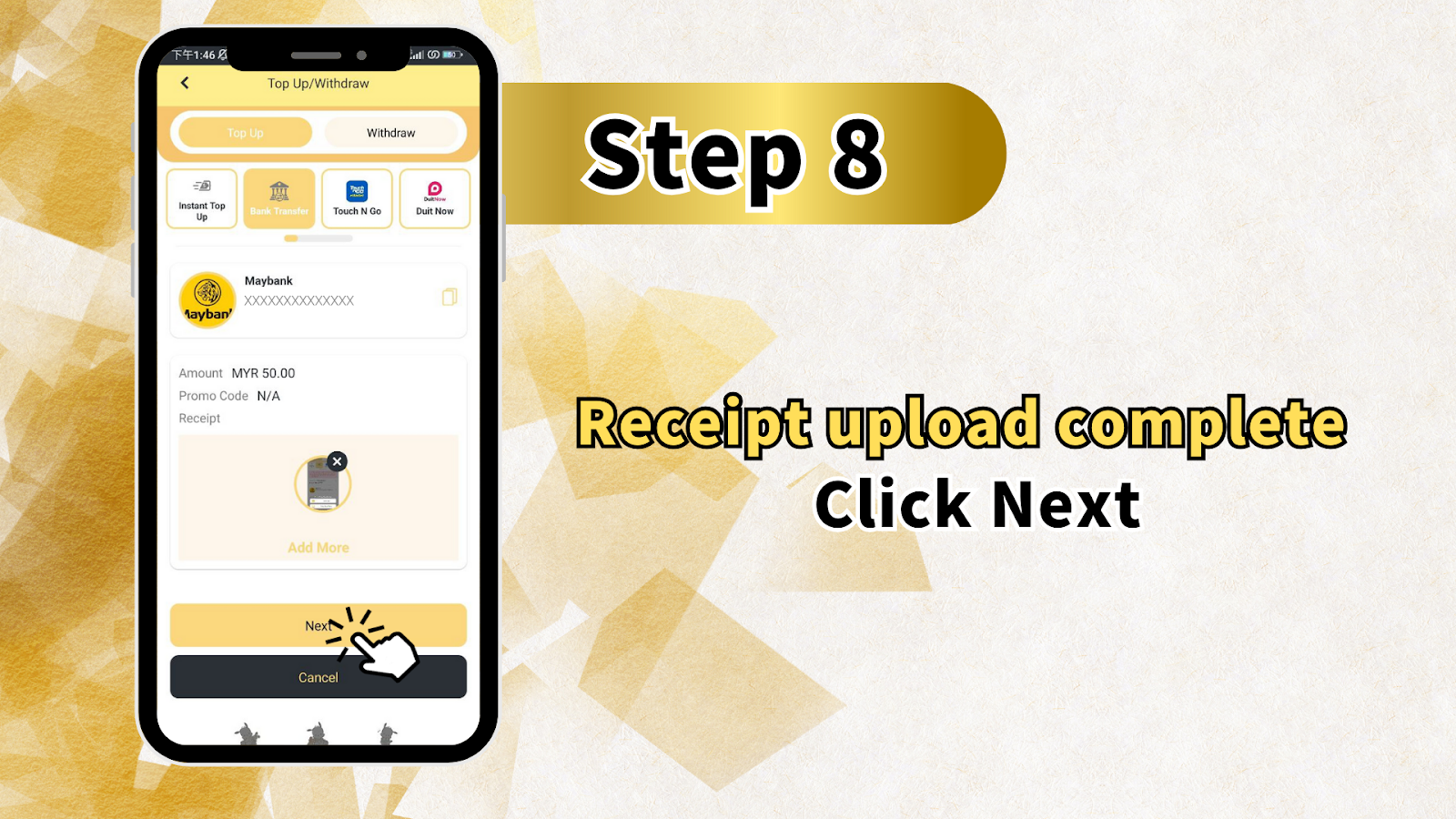
On the confirmation screen, you will see: Amount MYR [your amount], Promo Code N/A, and Receipt preview. You have options to Add More receipts if needed, or click Next to proceed. Verify that the amount shown matches your actual LUCKYTOWN bank transfer topup amount before confirming.
Step 9: System Confirmation and Processing
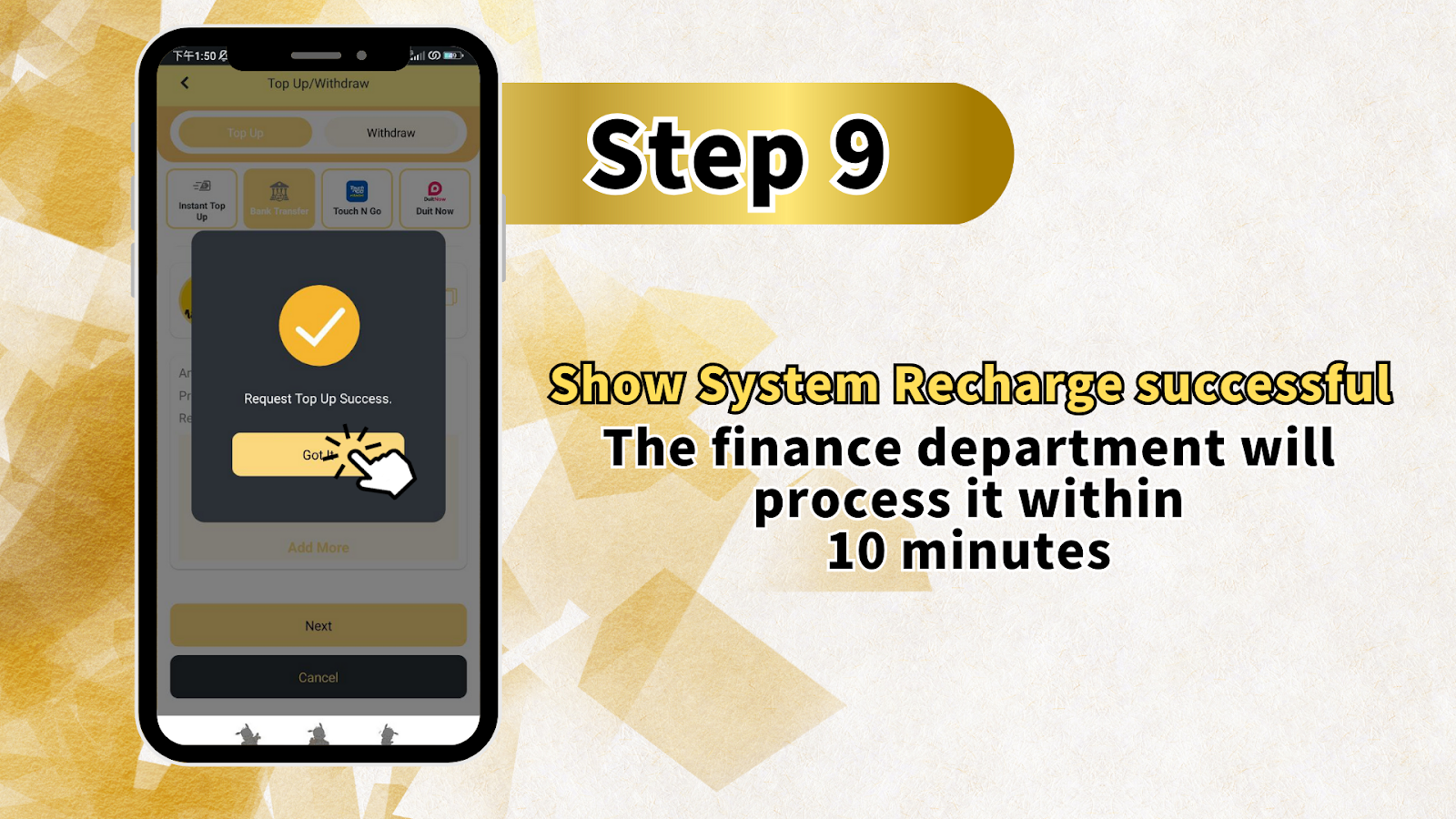
After submitting your receipt, the system displays: Show System Recharge successful. The finance department will process it within 10 minutes. Your LUCKYTOWN bank transfer topup is now complete and awaiting final verification. Funds will be credited to your LUCKYTOWN PLUS account shortly.
LUCKYTOWN Bank Transfer Topup Important Guidelines
Real Name Consistency Requirement
A critical rule for LUCKYTOWN bank transfer topup: If the real name and bank transfer account name submitted for payment are inconsistent, the company has the right to reject the submitted application. Ensure your bank account name exactly matches your verified real name on LUCKYTOWN PLUS.
Deposit Limits
LUCKYTOWN bank transfer topup has clear limits: Minimum deposit is MYR 20, and Maximum deposit is MYR 20,000. Plan your deposits accordingly and note that remaining time for transactions is unlimited, so there is no rush to complete transfers.
Available Banks
LUCKYTOWN PLUS supports bank transfer topups through four major Malaysian banks: Maybank, Public Bank, CIMB Bank, and Hong Leong Bank. Select your preferred bank when initiating the deposit.
Fraud Prevention Measures
LUCKYTOWN implements strict fraud prevention for bank transfer topups. Customers must ensure bank holder name matches deposit account name. Additionally, avoid using restricted keywords in transfer remarks as they may delay or prevent successful topups.
Processing Time
After completing your LUCKYTOWN bank transfer topup and uploading receipt, the finance department will process your transaction within 10 minutes. Funds are typically credited quickly during business hours.
Frequently Asked Questions About LUCKYTOWN Bank Transfer Topup
What is the minimum amount for bank transfer topup?
The minimum deposit amount for LUCKYTOWN bank transfer topup is MYR 20. This low minimum makes it accessible for all players to add funds to their LUCKYTOWN PLUS accounts.
What is the maximum amount for bank transfer topup?
The maximum deposit amount for LUCKYTOWN bank transfer topup is MYR 20,000 per transaction. For larger deposits, you may need to make multiple transactions or contact customer support for assistance.
Which banks are supported for LUCKYTOWN topup?
LUCKYTOWN bank transfer topup supports Maybank, Public Bank, CIMB Bank, and Hong Leong Bank. These four major Malaysian banks provide convenient options for most members.
What happens if my bank account name doesn't match my LUCKYTOWN real name?
If the real name and bank transfer account name submitted for payment are inconsistent, LUCKYTOWN has the right to reject the submitted application. Ensure names match exactly before initiating a bank transfer topup.
How long does processing take after receipt upload?
After completing your LUCKYTOWN bank transfer topup and uploading your receipt, the finance department will process it within 10 minutes. Funds are then credited to your LUCKYTOWN PLUS account.
What keywords should I avoid in bank transfer remarks?
Avoid using restricted keywords including: Sales/Purchases, Rent/Loan, Telecommunication station, Currency exchange, Medical supplies, Clothing supply, Electronic products, Transportation, Car parts, Motor parts, Luxury/Famous brand, Concert tickets/Coupons, Foods/Snacks/Fruits/Drink/Books and others. These may delay your LUCKYTOWN bank transfer topup.
Can I use QR transfer or ID transfer after topup?
To participate in special events, users will not be able to use QR transfer or ID transfer until turnover conditions of selected discounts are fulfilled, and after withdrawal through platform is completed and verified by customer service. Standard LUCKYTOWN bank transfer topup functionality remains available.
What if my topup doesn't process within 10 minutes?
If your LUCKYTOWN bank transfer topup exceeds the 10-minute processing window, contact customer support with your receipt and transaction details for assistance.
Why Choose LUCKYTOWN Bank Transfer Topup
Secure and Reliable Transactions
LUCKYTOWN bank transfer topup uses established banking channels with multiple security layers. Your funds transfer through trusted financial institutions before reaching your LUCKYTOWN PLUS account.
Clear Step-by-Step Process
The nine-step teaching guide ensures even first-time users can complete LUCKYTOWN bank transfer topup successfully. Each stage is clearly explained with visual references to the actual interface.
Fast Processing Times
With finance department processing within 10 minutes of receipt upload, LUCKYTOWN bank transfer topup gets funds into your account quickly so you can start playing your favorite games.
Multiple Bank Options
Support for Maybank, Public Bank, CIMB Bank, and Hong Leong Bank means most Malaysian players can use their existing bank accounts for LUCKYTOWN bank transfer topup without opening new accounts.
Fraud Protection
LUCKYTOWN's strict policies on name matching and restricted keywords protect both the platform and members from fraudulent activities. These measures ensure your LUCKYTOWN bank transfer topup reaches the correct account securely.
Additional Content: The LUCKYTOWN bank transfer topup feature represents the platform's commitment to providing secure, accessible funding options for Malaysian players. This comprehensive nine-step teaching guide transforms what could be a confusing process into a straightforward, manageable procedure that any member can follow successfully. Starting from the ME button at the bottom right of the main page, where your Cash, Chip, Games, Info, and Announcement sections are clearly displayed, the journey to funded account status becomes clear. The prominent Top Up and Withdraw buttons visible from Step 1 remind members that financial management is always just a click away. The extensive game catalog visible during the initial step, including 4D LOTTERY, PRAGMATIC, ADVANT PLAY, LUCKY365, BIG GAMING, IBCBET, SPORTS, PLAY TECH, WS GAMING, MEGA888, WON CASINO, and SBOPET, serves as motivation: these entertainment options await once your LUCKYTOWN bank transfer topup completes. The deposit method selection screen offers four major Malaysian banks: Maybank, Public Bank, CIMB Bank, and Hong Leong Bank. This coverage ensures that most members can use their existing banking relationships rather than opening new accounts. The minimum deposit of RM20 makes the platform accessible to players at all budget levels, while the RM20,000 maximum accommodates higher-volume players making significant deposits. The important notice about special events and QR transfer restrictions demonstrates LUCKYTOWN's commitment to promotion integrity. Members participating in bonus offers must understand that certain transfer features become temporarily unavailable until turnover conditions are met, a standard industry practice that protects both the platform and genuine entertainment members. The fraud prevention section provides crucial guidance for successful LUCKYTOWN bank transfer topup. The requirement that bank holder names match deposit account names protects against unauthorized transfers and ensures funds reach verified members only. The restricted keywords list, including sales, purchases, rent, loan, telecommunications, currency exchange, and various product categories, prevents transfers from being flagged by banking systems or misinterpreted as commercial transactions. Following these guidelines ensures smooth processing. After copying the provided LUCKYTOWN PLUS account number and completing the transfer through your banking app, the receipt upload step bridges your external bank transfer with your LUCKYTOWN account. This verification method ensures the finance department can match your payment to your account promptly. The confirmation screen showing your amount, promo code status, and receipt preview allows one final verification before submission. The 10-minute processing commitment from the finance department sets clear expectations, after uploading your receipt, funds should appear in your LUCKYTOWN PLUS account within this timeframe. During busy periods, processing may extend slightly, but the 10-minute target demonstrates the platform's efficiency focus. The eight-step process (actually nine with the final confirmation) balances thoroughness with efficiency. Each step builds logically on the previous one: ME -> Deposit/Withdrawal -> Top Up selection -> bank and amount selection -> fraud prevention review -> account number copy -> receipt upload -> confirmation -> processing completion. This logical flow minimizes confusion and reduces errors. For new members completing their first LUCKYTOWN bank transfer topup, the detailed instructions eliminate guesswork. For experienced members, the consistent process ensures reliable results every time. The warning about real name consistency, that mismatched names result in application rejection, protects both parties. Members who haven't completed real-name verification should do so before attempting bank transfer topups to avoid rejection. The fraud prevention measures, including restricted keyword avoidance, demonstrate LUCKYTOWN's proactive approach to security. By educating members about what banking systems may flag, the platform helps ensure successful transfers rather than simply rejecting problematic transactions after the fact. The unlimited remaining time for transactions removes pressure, members can complete their LUCKYTOWN bank transfer topup at their own pace without worrying about expiring windows. This relaxed approach aligns with LUCKYTOWN's people-first philosophy. The final "Show System Recharge successful" message provides positive confirmation that the process completed correctly, followed by the 10-minute processing expectation. This transparency about what happens next, and how long it will take, reduces anxiety about whether the deposit worked. Throughout the process, LUCKYTOWN PLUS branding maintains consistency, reinforcing that you're dealing with the official platform at every step. The reference to customer service for post-withdrawal verification of special events reminds members that support is available when needed. Whether you're funding your account to play 4D LOTTERY, explore PRAGMATIC slots, try LIVE CASINO games, or bet on SPORTS through IBCBET and SBOBET, the LUCKYTOWN bank transfer topup process provides the secure foundation for your entire gaming experience. Follow these nine steps, comply with fraud prevention guidelines, and enjoy fast processing of your deposits.
Complete Your LUCKYTOWN Bank Transfer Topup Today
Follow our nine-step teaching guide to add funds to your LUCKYTOWN PLUS account. Minimum RM20, maximum RM20,000. Maybank, Public Bank, CIMB Bank, Hong Leong Bank supported. Finance processing within 10 minutes of receipt upload.
Start Bank Transfer Topup Now