
Recommend Friends on LUCKYTOWN: Complete Step-by-Step Guide
LUCKYTOWN Recommend Friends -Share and Earn Together

Introduction to LUCKYTOWN Friend Referral Program
The LUCKYTOWN Recommend Friends feature allows existing members to invite new players to join LUCKYTOWN PLUS through various sharing methods. This comprehensive guide walks you through every step of the referral process, from accessing the feature to troubleshooting common issues. Whether you prefer sharing QR codes, transferring directly, or sending registration links, LUCKYTOWN provides multiple options to help you grow the community while helping friends discover Malaysia's premier gaming platform.
Step-by-Step Guide to Recommend Friends at LUCKYTOWN

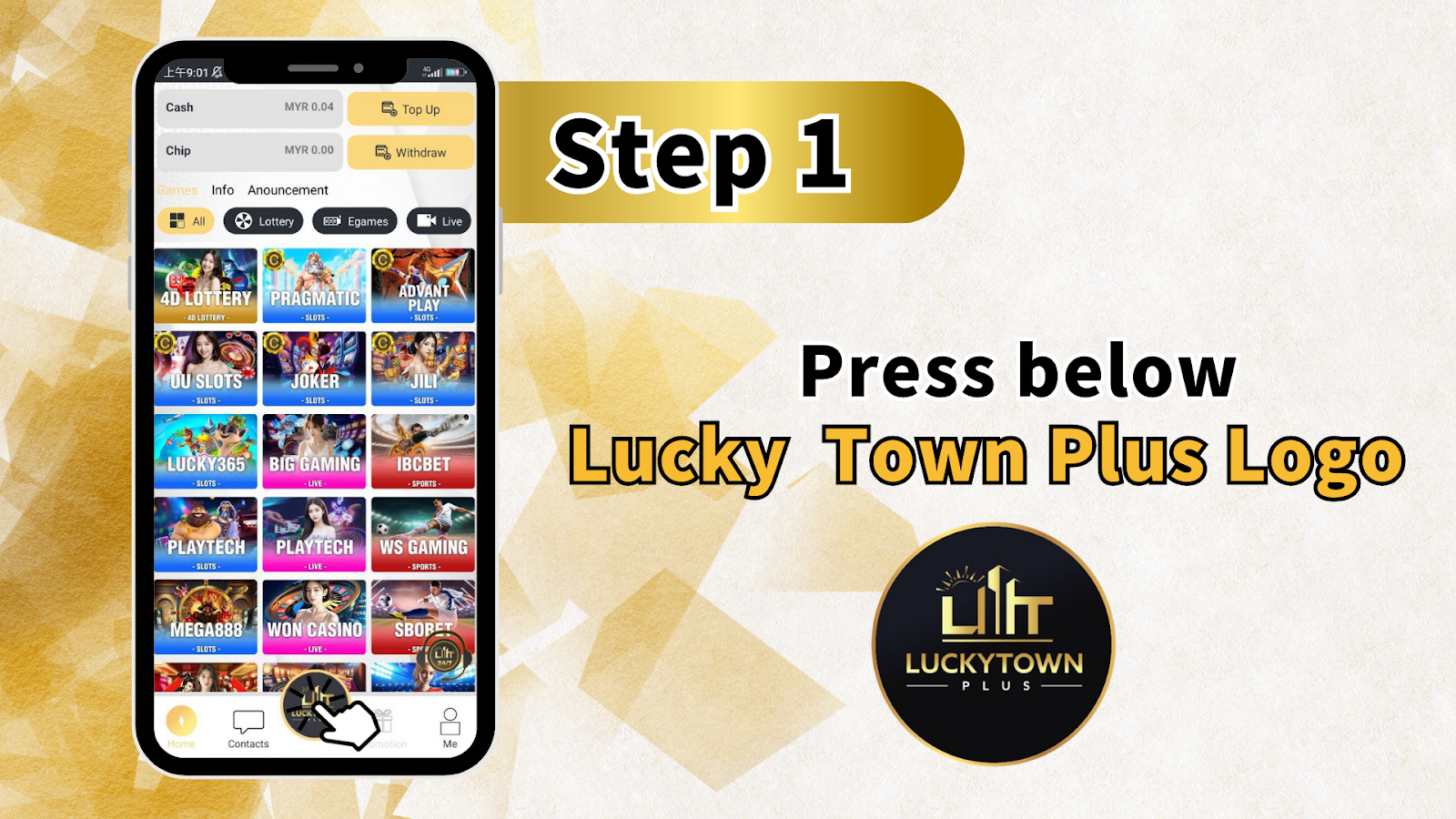
Step 1: Press Below Lucky Town Plus Logo
To begin the LUCKYTOWN Recommend Friends process, locate the Lucky Town Plus Logo at the bottom of your screen. Press or click directly on the logo to access the referral options. This action opens the sharing interface where all recommendation tools become available. The LUCKYTOWN PLUS logo serves as the gateway to inviting friends and expanding your network.
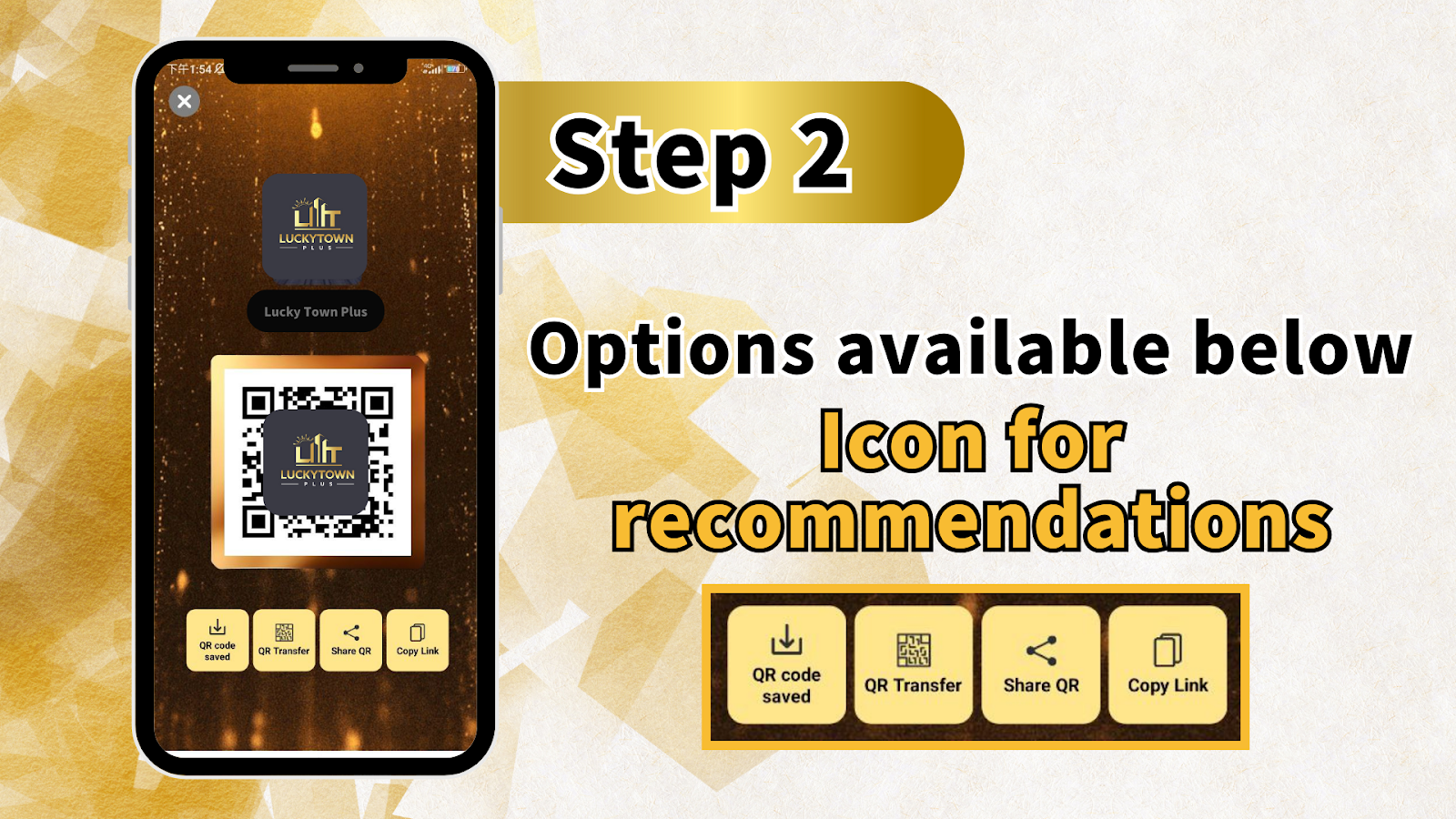
Step 2: Access Referral Options
After pressing the LUCKYTOWN PLUS logo, you will see the Lucky Town Plus / LuckyTownPlus interface with multiple sharing options. Your screen will display "QR code saved," "QR Transfer," "Share QR," and "Copy Link" as available options below the icon for recommendations. LUCKYTOWN provides these four distinct methods to accommodate different sharing preferences and situations.
Step 3: Select Your Preferred Promotion Option
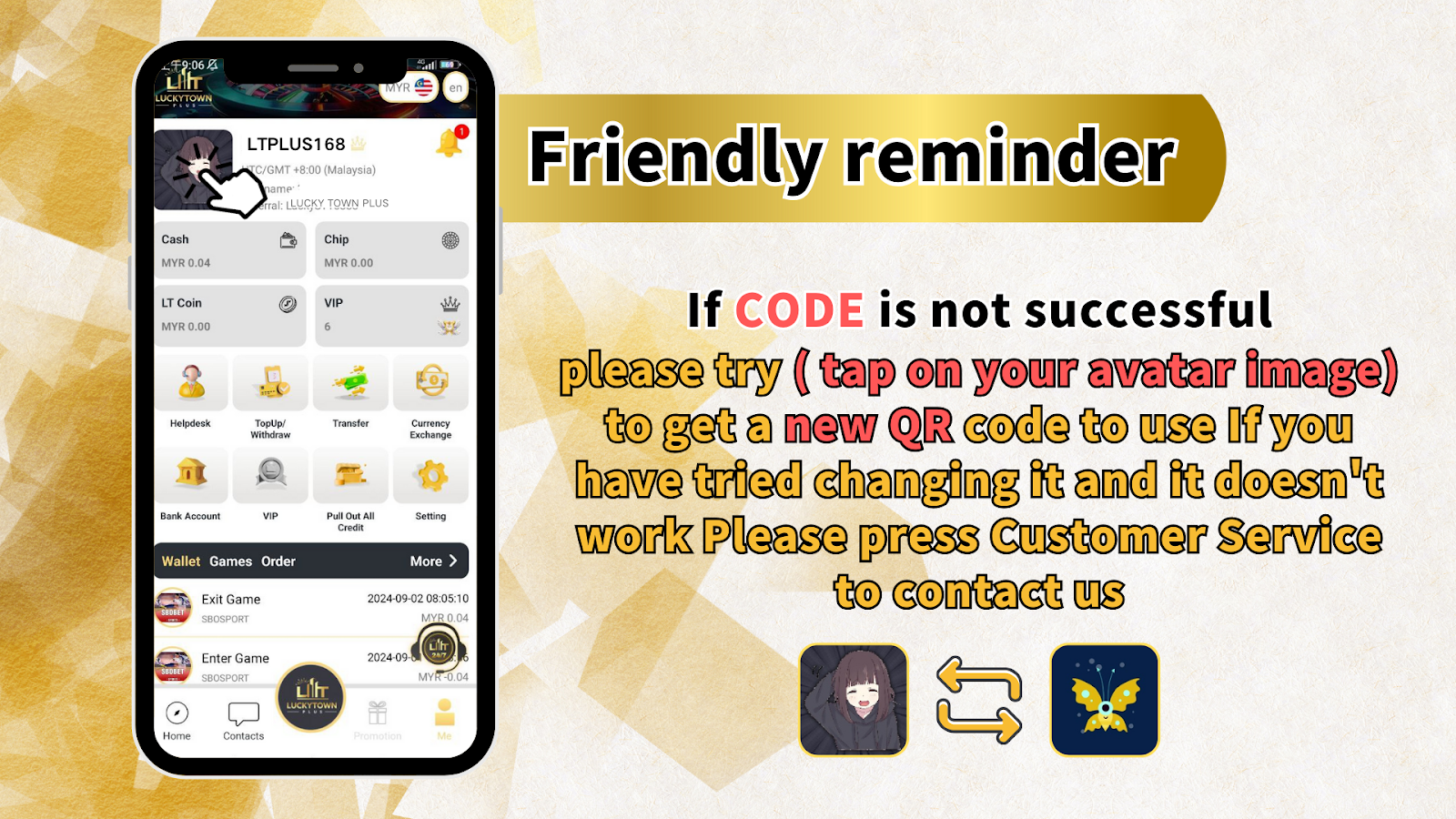
LUCKYTOWN Recommend Friends offers four ways to share with potential new members. Choose the method that works best for your situation:
Option 1: QR Can Be Saved for Promotion
Select this option to save your unique LUCKYTOWN PLUS QR code directly to your device. The QR code saves to your photo gallery, allowing you to share it later through any messaging app, social media platform, or in-person by showing the saved image. This method works well for reaching friends across multiple channels.
Option 2: Transfer (Scan the Code to Transfer Money to Another Player's Account)
The Transfer feature in LUCKYTOWN Recommend Friends enables peer-to-peer fund transfers between LUCKYTOWN PLUS accounts. Scan another player's QR code to transfer money directly to their account. This function serves both referral purposes and convenient account-to-account transactions.
Option 3: Share QR Code (Can Be Shared to Other Apps for Promotion)
Use the Share QR feature to instantly send your LUCKYTOWN PLUS referral QR code to other applications on your device. Whether sharing via WhatsApp, Telegram, Facebook, Messenger, or any installed app, this option streamlines the promotion process. Recipients can scan the QR code to access LUCKYTOWN registration directly.
Option 4: Copy Link (Click the Link to Register)
The Copy Link function generates a unique LUCKYTOWN referral URL that you can paste anywhere. Friends who click the link go directly to LUCKYTOWN PLUS registration. This method works especially well for sharing in group chats, email invitations, or social media posts where QR code scanning may be less convenient.
Understanding LUCKYTOWN Referral Tools
QR Code System Overview
The LUCKYTOWN Recommend Friends system centers around personalized QR codes that identify you as the referring member. Each LUCKYTOWN PLUS account generates unique QR codes that track referrals back to your account, ensuring you receive appropriate credit for new members you bring to the platform.
QR Code Saved Function
When you select "QR code saved," LUCKYTOWN generates and stores your current referral QR code to your device's photo gallery. This permanent copy allows unlimited sharing without needing to regenerate the code each time. The saved QR code remains valid for ongoing referral campaigns.
QR Transfer Capability
The QR Transfer feature within LUCKYTOWN Recommend Friends enables direct fund movement between LUCKYTOWN PLUS accounts. This secure transfer system requires scanning the recipient's QR code, ensuring funds reach the correct destination without manual entry errors.
Share QR Code to Other Apps
LUCKYTOWN's integration with device sharing capabilities allows instant distribution of your referral QR code to any installed application. This seamless sharing experience eliminates the need to save and manually upload images, streamlining the promotion process for LUCKYTOWN PLUS members.
Copy Link Function
For situations where QR codes aren't ideal, the Copy Link option provides a traditional URL-based referral method. The copied link directs recipients to LUCKYTOWN registration while maintaining referral tracking, ensuring you receive proper credit for new members joining through this method.
Troubleshooting LUCKYTOWN Recommend Friends Issues
Friendly Reminder: When CODE Is Not Successful
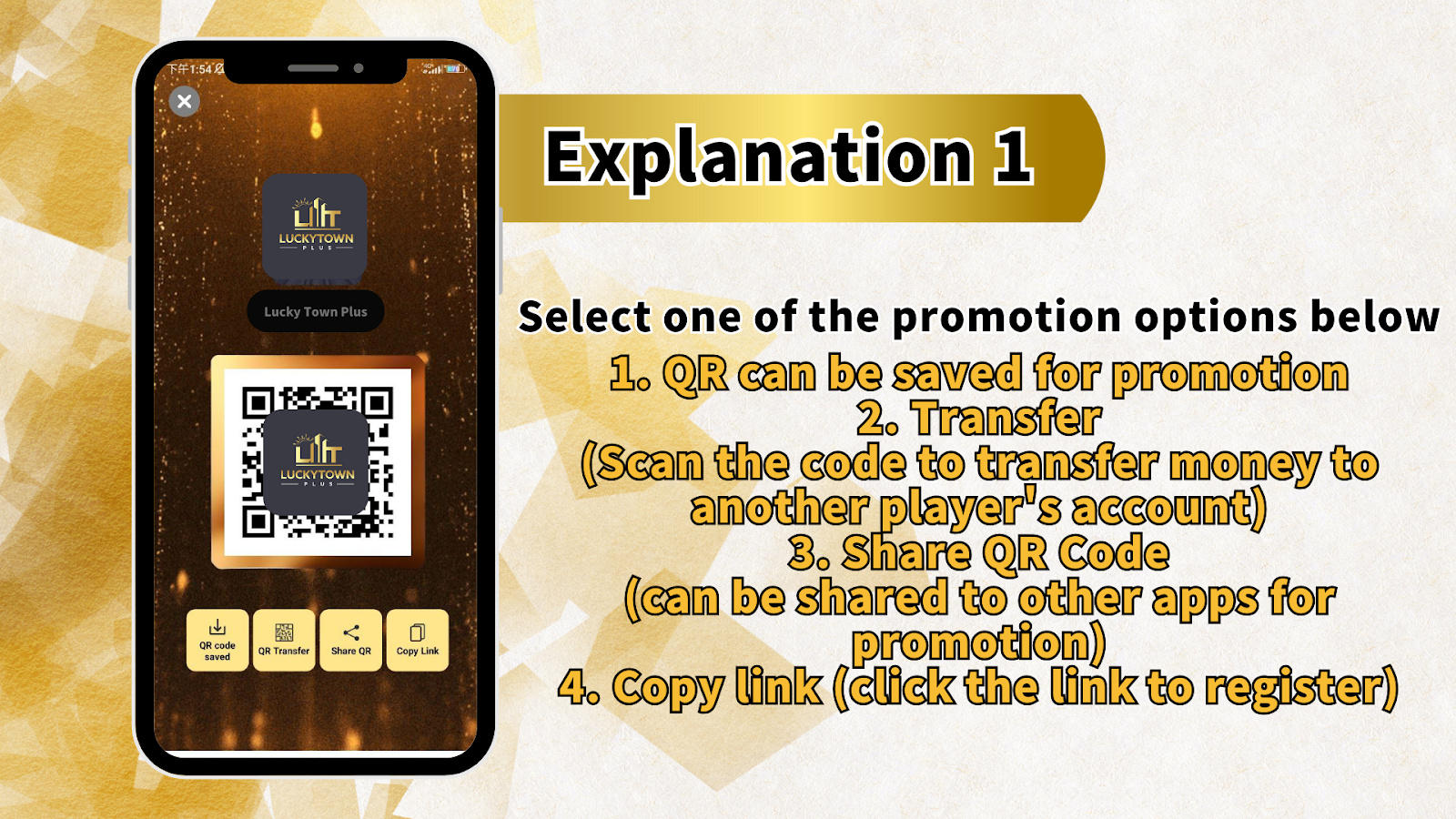
If you encounter issues with your LUCKYTOWN Recommend Friends code not working successfully, LUCKYTOWN PLUS provides simple troubleshooting steps. Don't worry, most referral code problems have easy solutions that restore functionality quickly.
Solution: Tap on Your Avatar Image
When your LUCKYTOWN Recommend Friends code fails, try tapping on your avatar image. This action refreshes your referral credentials and generates a new QR code for you to use. The avatar tap method serves as the primary troubleshooting step for most code-related issues.
Getting a New QR Code
If you have tried changing your referral code through the avatar method and it doesn't work, LUCKYTOWN PLUS provides additional support. The system allows you to generate fresh QR codes as needed, ensuring you always have functional sharing tools for your LUCKYTOWN Recommend Friends efforts.
Contact Customer Service
When troubleshooting steps don't resolve your LUCKYTOWN Recommend Friends issues, please press Customer Service to contact us. LUCKYTOWN PLUS support representatives are ready to assist with any persistent problems, ensuring your referral activities continue without interruption.
Best Practices for LUCKYTOWN Friend Referrals
Choose the Right Sharing Method
LUCKYTOWN Recommend Friends offers multiple sharing options to match different situations. For in-person referrals, saved QR codes work well. For online sharing, the Share QR and Copy Link functions provide maximum reach. Select the method your friends will find most convenient.
Share Clear Instructions
When recommending LUCKYTOWN PLUS to friends, include brief instructions on how to complete registration after clicking your link or scanning your QR code. Clear guidance increases conversion rates and helps friends navigate the sign-up process smoothly.
Follow Up on Referrals
After sharing your LUCKYTOWN Recommend Friends link or QR code, follow up with friends who expressed interest. Answer any questions they have about LUCKYTOWN PLUS features, games, and promotions to help them feel confident about joining.
Keep Your QR Code Accessible
Save your LUCKYTOWN referral QR code to an easily accessible location on your device. Having the code ready at all times allows you to seize unexpected opportunities to recommend LUCKYTOWN PLUS when conversations naturally turn to online gaming.
Frequently Asked Questions About LUCKYTOWN Recommend Friends
How do I start recommending friends at LUCKYTOWN?
To begin using LUCKYTOWN Recommend Friends, press the Lucky Town Plus Logo at the bottom of your screen. This action opens the sharing interface where you can save QR codes, transfer funds, share QR codes, or copy referral links.
What if my referral code doesn't work?
If your CODE is not successful in LUCKYTOWN Recommend Friends, please try tapping on your avatar image to get a new QR code. If you have tried changing it and it doesn't work, press Customer Service to contact LUCKYTOWN PLUS support for assistance.
Can I use multiple sharing methods?
Yes. LUCKYTOWN Recommend Friends allows you to use all available methods, saved QR codes, QR transfer, share QR, and copy link, simultaneously. Different friends may prefer different sharing methods, and LUCKYTOWN PLUS supports all options.
Is QR transfer only for referrals?
While QR Transfer is part of LUCKYTOWN Recommend Friends, it also serves as a general peer-to-peer fund transfer tool. You can scan another player's QR code to transfer money to their LUCKYTOWN PLUS account for any purpose.
How do I know my referral was successful?
LUCKYTOWN tracking systems monitor all referral activity through your unique QR code or link. When friends register using your referral method, the system automatically records the successful recommendation. Check your LUCKYTOWN PLUS account for referral updates.
Can I share my referral code on social media?
Absolutely. The LUCKYTOWN Recommend Friends "Share QR" and "Copy Link" functions are designed specifically for sharing across social media platforms, messaging apps, and other online channels. Share your LUCKYTOWN PLUS referral code widely to maximize friend invitations.
Why Use LUCKYTOWN Recommend Friends
Grow the LUCKYTOWN Community
Every time you use LUCKYTOWN Recommend Friends, you help expand Malaysia's most trusted gaming community. Inviting friends who share your interests creates shared experiences and makes gaming more social and enjoyable for everyone.
Simple Four-Option System
LUCKYTOWN PLUS designed the Recommend Friends feature with simplicity in mind. Four clear options, save QR, transfer, share QR, copy link, cover every possible sharing scenario without overwhelming complexity. Choose what works, share, and watch friends join.
Reliable Tracking and Support
LUCKYTOWN's referral system accurately tracks all recommendations made through your unique codes. And if anything goes wrong, the friendly reminder troubleshooting steps and customer service access ensure problems get resolved quickly, keeping your LUCKYTOWN Recommend Friends efforts on track.
Multiple Touchpoints for Success
With four distinct sharing methods, LUCKYTOWN Recommend Friends adapts to any situation. Save QR codes for in-person sharing, use QR transfer for direct friend transactions, share QR codes to social apps, or copy links for text-based invitations. Maximum flexibility means maximum referral success.
Additional Content: The LUCKYTOWN Recommend Friends feature represents the platform's commitment to community growth through member-powered referrals. By providing four distinct sharing methods, saved QR codes, QR transfer, share QR to apps, and copy link, LUCKYTOWN PLUS ensures every member can invite friends using their preferred communication channels. The process begins with a simple action: pressing the Lucky Town Plus Logo at the bottom of your screen. This intuitive starting point makes the referral system accessible to members of all technical skill levels. From there, the interface presents clear options: QR code saved, QR Transfer, Share QR, and Copy Link. Each option serves specific use cases. The saved QR function creates a permanent image file in your photo gallery, perfect for in-person sharing or posting across multiple platforms over time. QR Transfer adds utility beyond referrals by enabling direct peer-to-peer fund movement between LUCKYTOWN PLUS accounts, scan another player's QR code to send money instantly and securely. Share QR integrates with your device's native sharing capabilities, allowing one-tap distribution to WhatsApp, Telegram, Facebook, Messenger, and any other installed application. This seamless sharing experience eliminates extra steps, keeping the referral process fluid and natural. Copy Link generates a traditional URL that works anywhere text can be pasted: email invitations, group chats, social media posts, or website comments. The comprehensive approach ensures no potential referral channel goes unused. LUCKYTOWN understands that different friends respond to different invitation methods, some prefer scanning QR codes, others appreciate clickable links. By offering both, LUCKYTOWN PLUS maximizes your chances of successful recommendations. The troubleshooting section demonstrates LUCKYTOWN's people-first commitment. The friendly reminder addresses the most common issue: CODE not successful. The solution, tap on your avatar image to get a new QR code, puts control back in your hands without requiring customer service intervention for simple problems. If avatar tapping doesn't resolve the issue, LUCKYTOWN PLUS provides direct customer service access for personalized assistance. This tiered support approach ensures minor issues get quick self-service fixes while complex problems receive dedicated attention. The referral numbers displayed in the first image, 1 through 1388, hint at the comprehensive tracking system behind LUCKYTOWN Recommend Friends. Each referral code corresponds to a unique member identifier, ensuring every recommendation receives proper attribution. Whether you're referring your first friend or your thousandth, LUCKYTOWN's system accurately tracks your impact on community growth. The LUCKYTOWN PLUS branding throughout the interface reinforces platform identity and builds trust with both existing members and referred friends. When friends receive your QR code or link, they see professional, consistent branding that signals legitimacy and reliability. This visual consistency supports conversion by reducing uncertainty about the platform's authenticity. For members actively promoting LUCKYTOWN, the multiple sharing options enable sophisticated referral strategies. Save QR codes for in-person events where you can show your phone screen. Use Share QR for quick distribution to WhatsApp groups. Copy links for forum posts or email signatures. QR Transfer for helping friends fund their new accounts immediately after registration. Each tool serves a purpose in building a comprehensive referral approach. The customer service contact option provides peace of mind for members who encounter persistent issues. Knowing that LUCKYTOWN PLUS support stands ready to help encourages continued referral efforts even when technical glitches arise. This reliability builds long-term trust in the Recommend Friends system. LUCKYTOWN's helpful, people-first philosophy extends to every aspect of the referral experience. Clear instructions, multiple sharing methods, straightforward troubleshooting, and accessible customer support all work together to create a referral system that actually helps members succeed. No confusing steps, no hidden requirements, no abandoned referral attempts due to technical barriers. The Recommend Friends feature simply works, and when it occasionally doesn't, clear solutions restore functionality quickly. Whether you're recommending LUCKYTOWN to one close friend or launching a full-scale referral campaign across multiple platforms, the tools provided support your goals. Press the Lucky Town Plus Logo, choose your sharing method, and start helping friends discover everything LUCKYTOWN PLUS offers. From lottery and slots to sports betting and promotions, your referrals gain access to Malaysia's most comprehensive gaming platform, and you gain the satisfaction of sharing something valuable with people you care about.
Start Recommending Friends to LUCKYTOWN PLUS Today
Press the Lucky Town Plus Logo to access QR code saving, QR transfer, share QR, and copy link options. Invite friends to join Malaysia's premier gaming platform. Troubleshooting help available if codes don't work.
Recommend Friends Now