
LUCKYTOWN Forgot Transfer Password: Complete Guide for LUCKYTOWN PLUS Members
LUCKYTOWN PLUS Forgot/Change Payment PIN: Solution to Teaching Steps


Introduction to LUCKYTOWN Forgot Transfer Password
The LUCKYTOWN forgot transfer password guide helps members recover or change their 6-digit transaction pin, also known as the payment PIN, used for withdrawals and other financial actions. Whether you still remember the current PIN and want to change it, or you forgot it completely and need OTP-based recovery, this guide walks through both paths. LUCKYTOWN PLUS members can reset the transaction pin securely through the registered phone number.
Method 1: LUCKYTOWN Change Payment PIN (When You Know Current PIN)
Step 1: Please Click on the Bottom Right Corner of the Main Page ME
To begin your LUCKYTOWN change payment PIN process while logged in, go to the main page of your LUCKYTOWN PLUS account and tap the ME section in the bottom-right corner. This area contains your account management options.
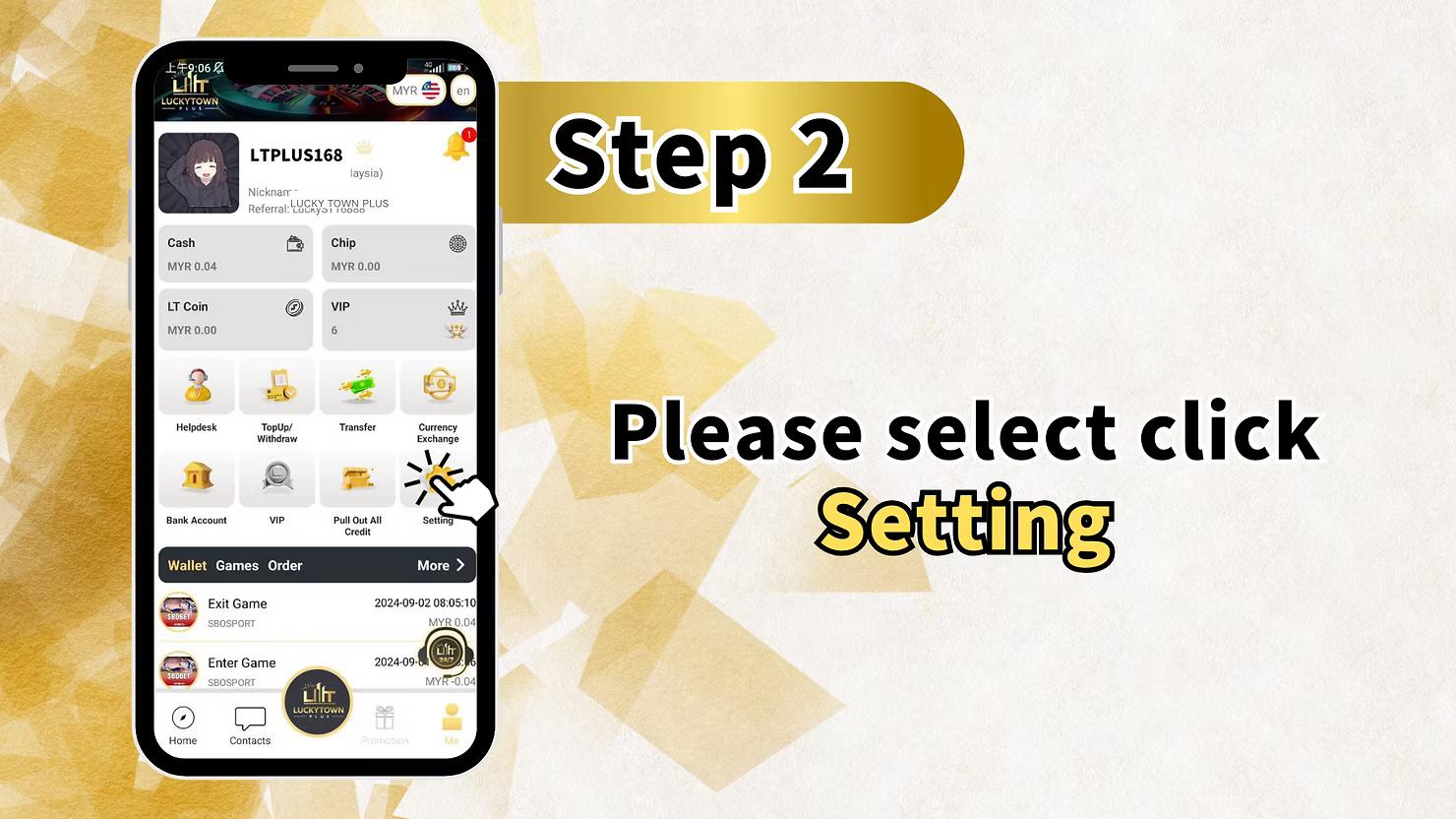
Step 2: Please Select Click Setting
After entering ME, select Setting to open your account configuration options for payment PIN changes and other preferences.
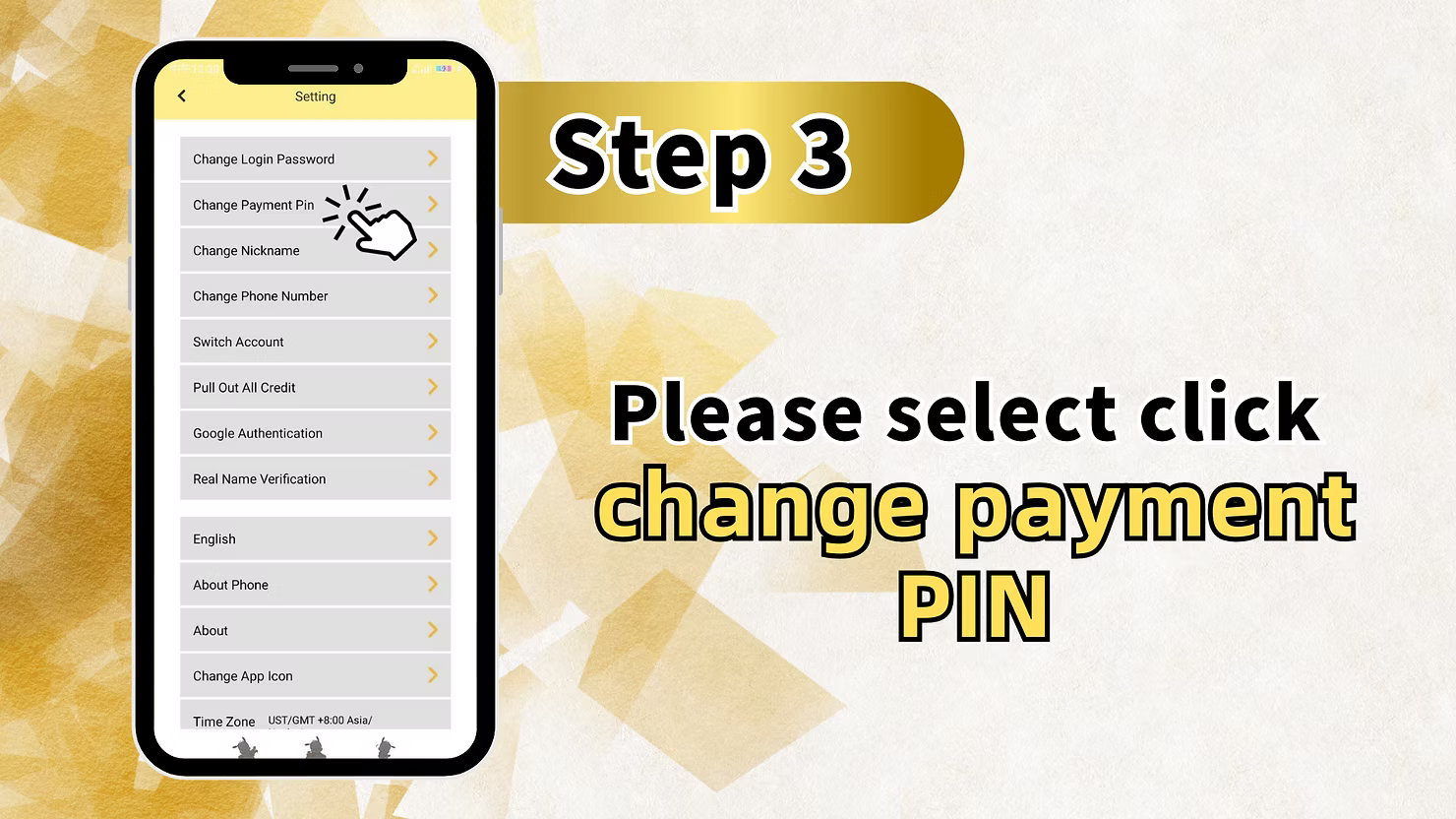
Step 3: Please Select Click Change Payment PIN
Inside the Setting menu, choose Change Payment Pin. This menu also contains Change Login Password, Change Nickname, Change Phone Number, Switch Account, Pull Out All Credit, Google Authentication, Real Name Verification, Change App Icon, and Time Zone.
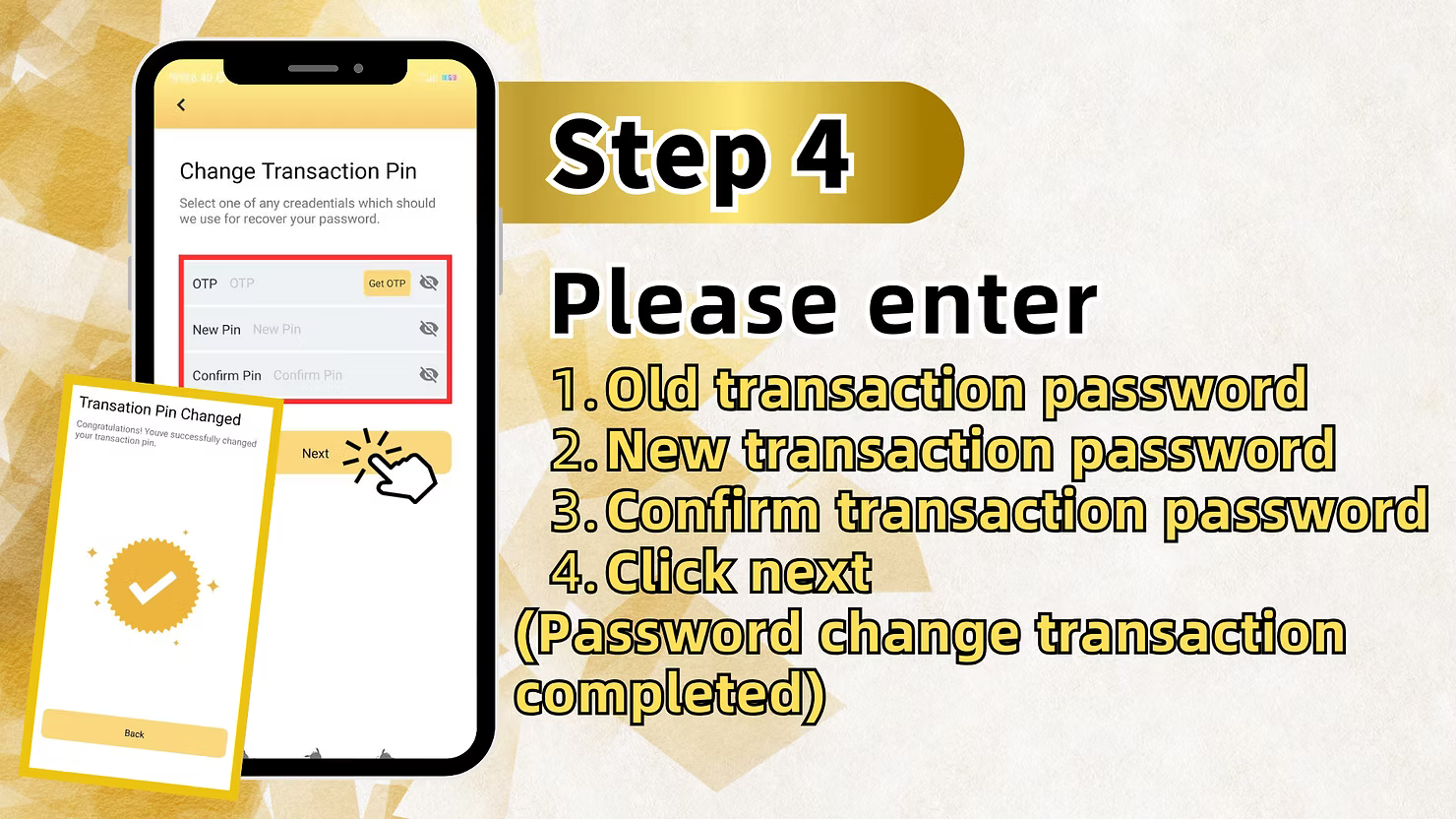
Step 4: Enter Old and New Transaction Password
On the Change Transaction Pin screen, enter your current 6-digit transaction pin in Old Transaction Password. Then enter the new 6-digit transaction pin in both New Transaction Password and Confirm Transaction Password. Click Next to complete the LUCKYTOWN change payment PIN request, and the system will confirm the transaction password change.
Method 2: LUCKYTOWN Forgot Transfer Password Recovery (Via Withdrawal Page)
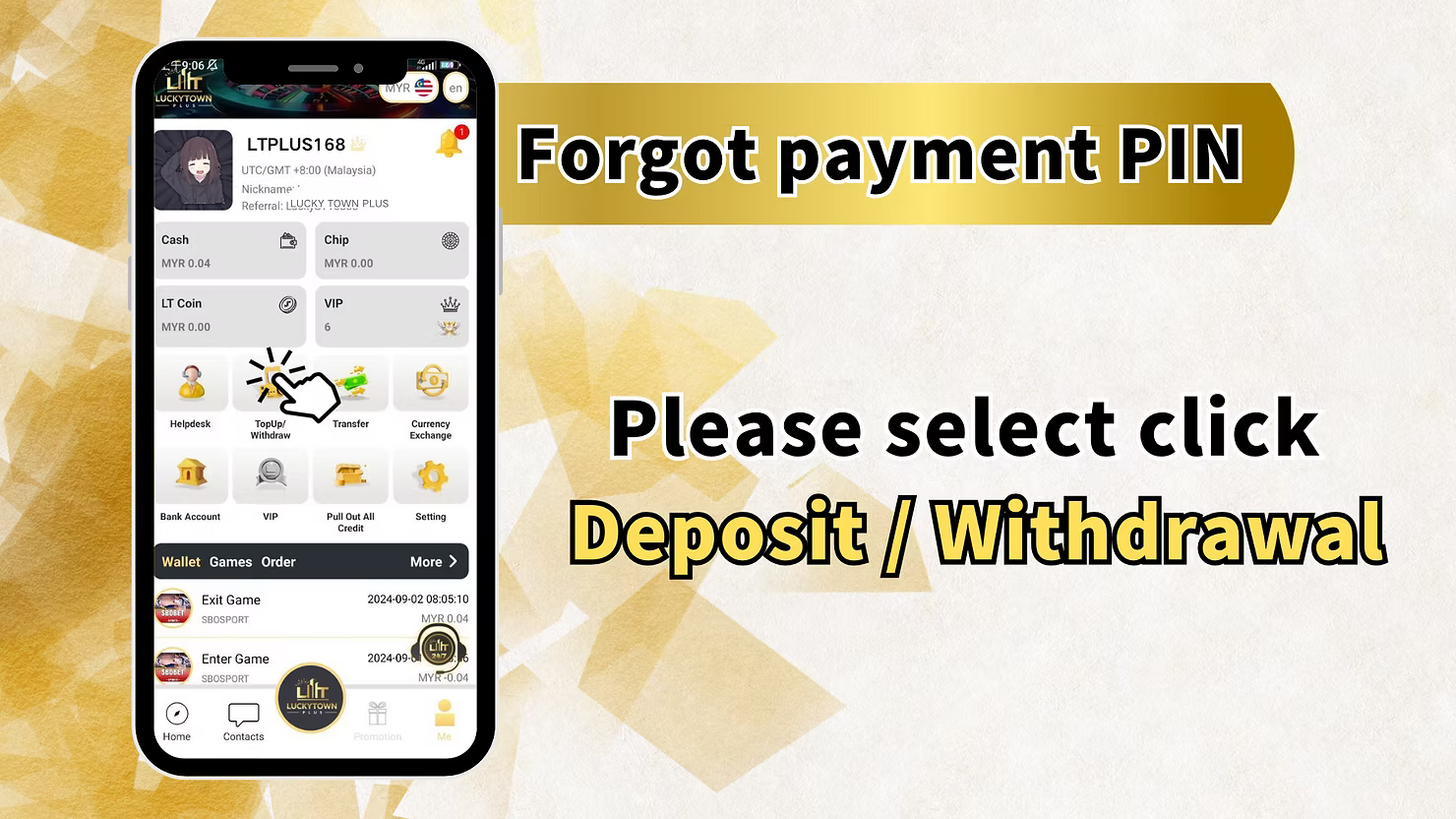
Step 1 (Alternate): Please Select Click Deposit / Withdrawal
If you need LUCKYTOWN forgot transfer password recovery because you do not remember the current PIN, tap ME and then choose Deposit / Withdrawal instead of Setting. This path uses the withdrawal interface to start PIN recovery.
Step 2: Select Withdrawal and Agree to Terms
On the TOP UP | WITHDRAW screen, select Withdraw. You will see your Account Name, the Withdraw (MYR) field, the Max button, and the limits shown on screen. Read the fraud-prevention notice and tick the I have read and agree checkbox before continuing with LUCKYTOWN forgot transfer password recovery.
Step 3: Access Forgot Payment PIN Option
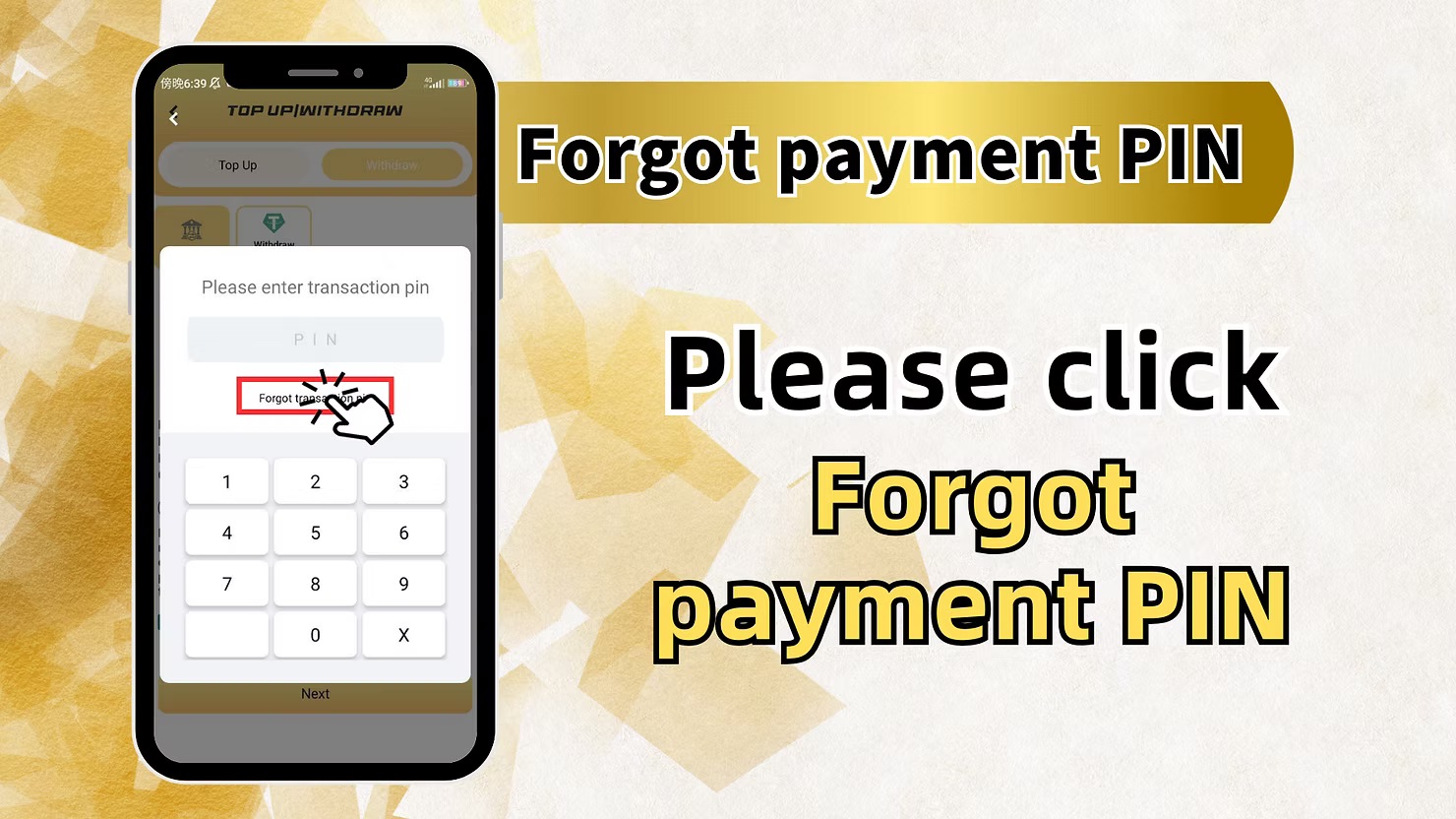
After checking the agreement box, the system reveals the forgot payment PIN path. Follow the withdrawal flow and proceed into the forgot PIN option to continue recovery.
Step 4: Enter Registered Phone Number
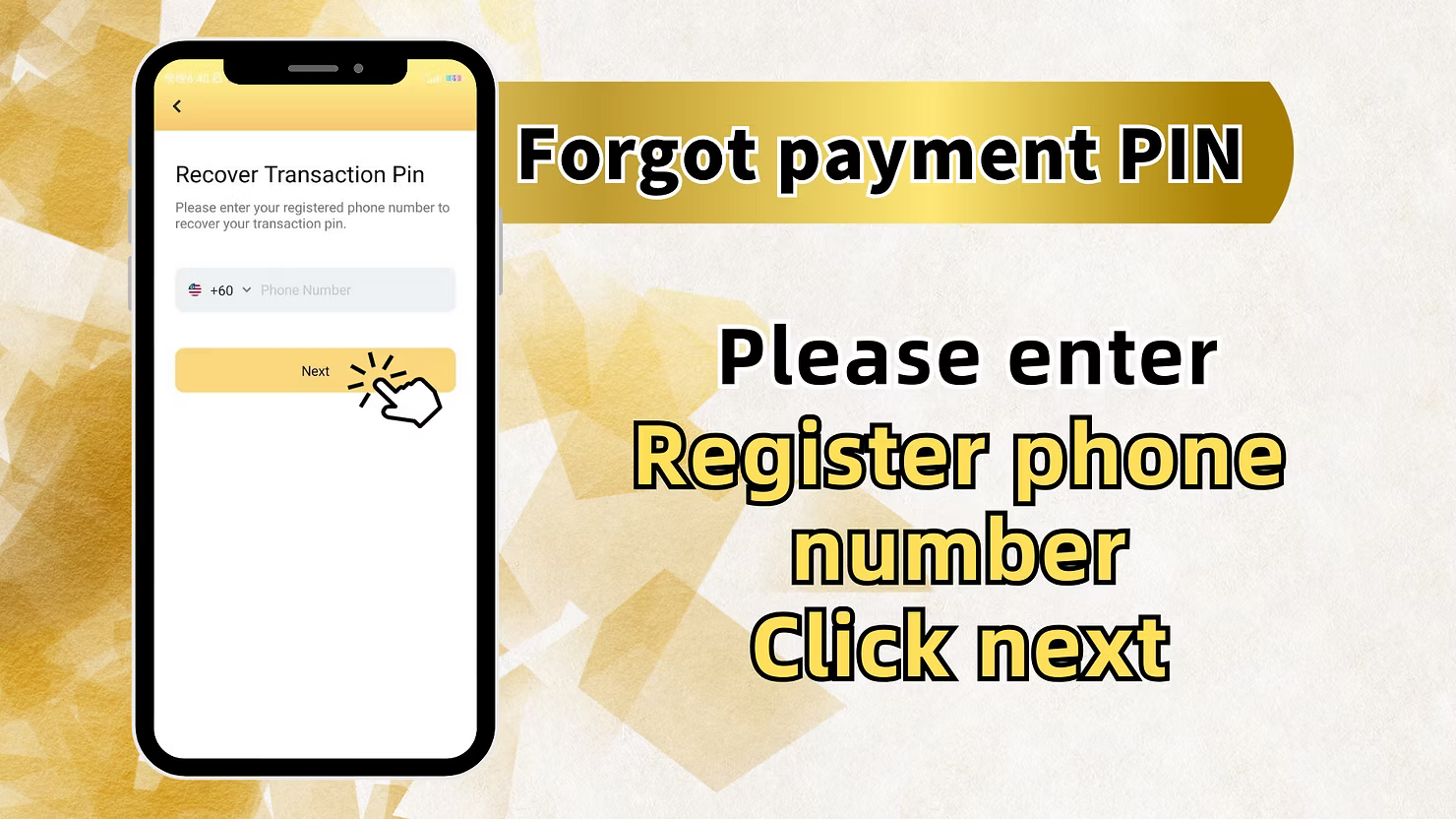
The Recover Transaction Pin screen asks for your registered phone number. Enter the +60 phone number linked to your LUCKYTOWN PLUS account, then click Next to continue the forgot transfer password recovery process.
Step 5: Get OTP and Enter New Transaction PIN
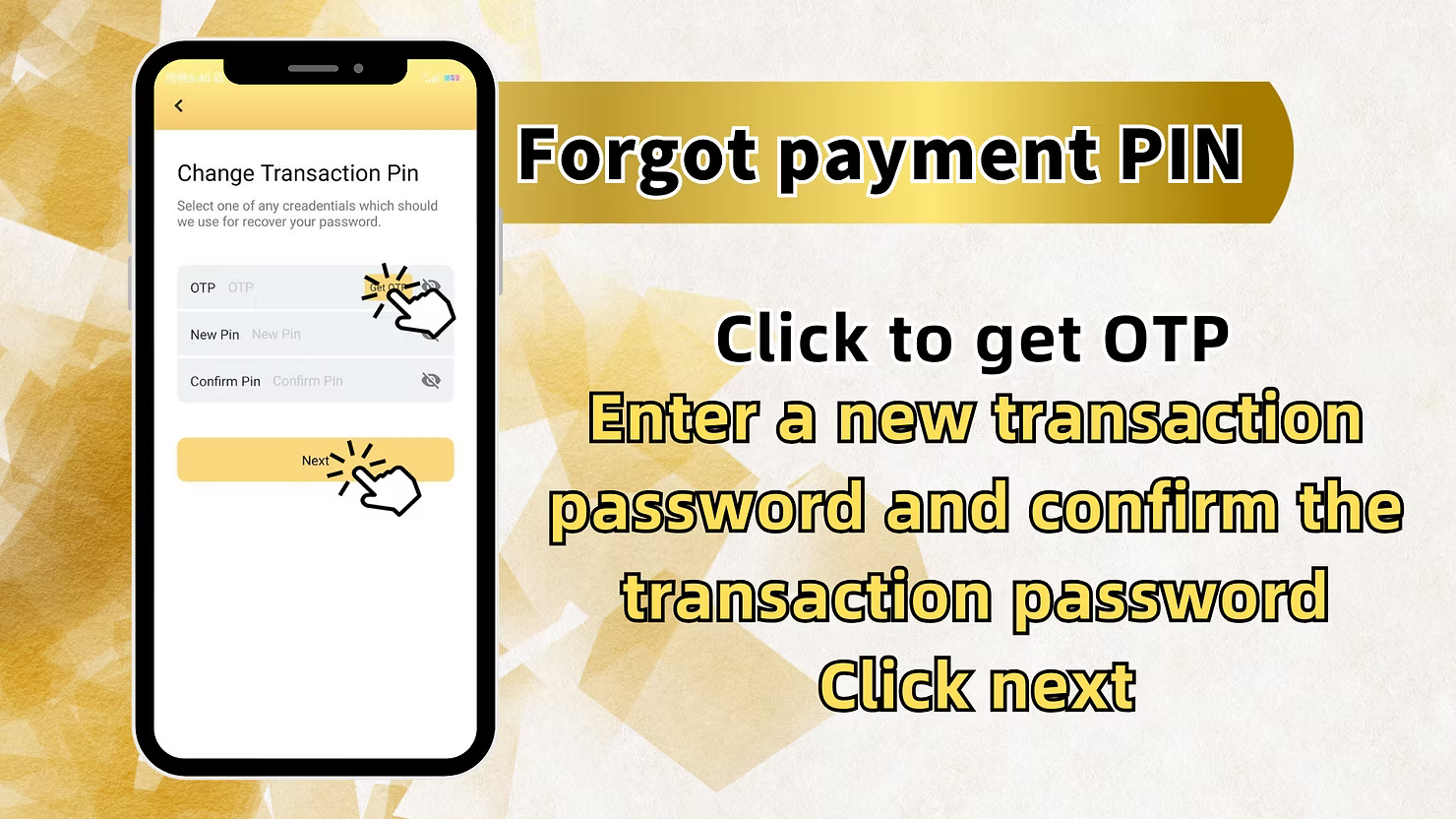
On the forgot payment PIN version of the Change Transaction Pin screen, request OTP to your registered mobile number and enter the code you receive. Then fill in the New Pin and Confirm Pin fields with your new 6-digit transaction pin.
Step 6: Click Next to Complete
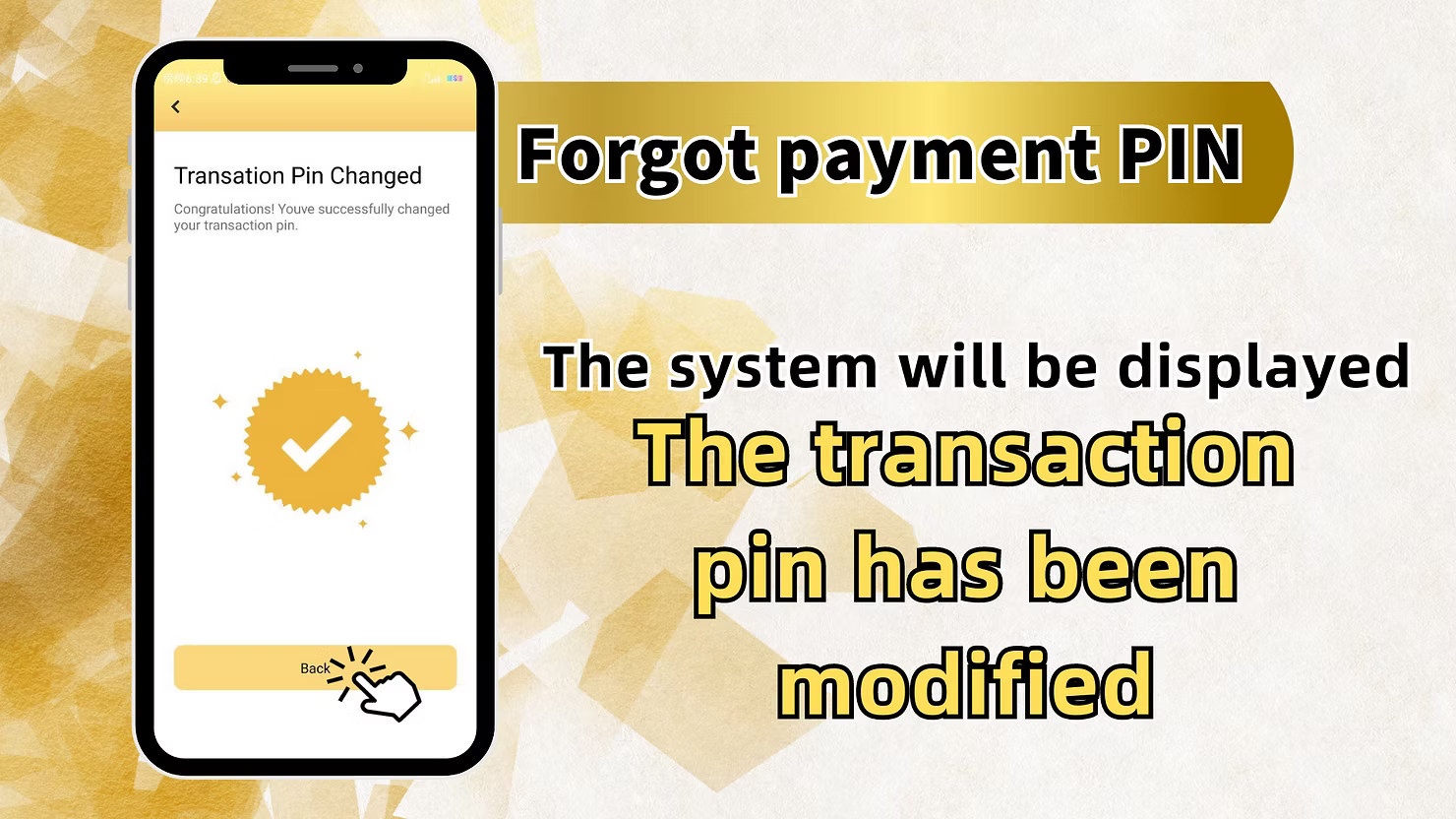
After entering the OTP and confirming the new transaction pin, click Next. The system will display Transaction Pin Changed together with the confirmation message that your transaction pin has been updated successfully.
LUCKYTOWN Forgot Transfer Password Important Guidelines
Transaction PIN Purpose
Your LUCKYTOWN transaction pin, also called payment PIN or transfer password, is a 6-digit code used to authorize withdrawals and other financial transactions. It is separate from the login password.
Two Recovery Paths
LUCKYTOWN forgot transfer password supports two methods: change the PIN through Settings when you know the current PIN, or recover it through OTP on the withdrawal page when you forgot it completely.
Phone Number Requirement
For OTP-based forgot transfer password recovery, you must still have access to the +60 phone number registered on your account. The recovery code is sent to that number.
OTP Verification Process
When recovering the transaction pin, LUCKYTOWN sends a one-time password to your registered mobile number. Enter it quickly because it expires after a short period.
PIN Security
Your transaction pin is a critical security control for LUCKYTOWN financial transactions. Never share it with anyone, and choose a memorable but secure 6-digit code.
Frequently Asked Questions About LUCKYTOWN Forgot Transfer Password
What is the difference between login password and transaction pin?
Your login password gives access to the LUCKYTOWN PLUS account, while the transaction pin authorizes withdrawals and other financial actions. LUCKYTOWN forgot transfer password refers specifically to the 6-digit transaction pin.
How do I change my transaction pin if I remember it?
Go to ME, open Setting, select Change Payment Pin, enter the old PIN and the new PIN twice, then click Next. That is the standard LUCKYTOWN change payment PIN flow.
How do I recover my transaction pin if I forgot it?
Go to ME, open Deposit/Withdrawal, select Withdraw, tick I have read and agree, enter the forgot PIN recovery path, provide the registered phone number, get OTP, and then set the new PIN.
What phone number should I use for recovery?
Use the +60 phone number that was registered when the LUCKYTOWN PLUS account was created. OTP for forgot transfer password recovery is sent to that number.
How long does OTP remain valid?
OTP codes expire after a short period for security. Request a new code if the OTP expires before you enter it.
What if I do not have access to my registered phone number?
If you cannot receive OTP for LUCKYTOWN forgot transfer password recovery, contact customer support through the app for alternative verification support.
Will I see confirmation after successful PIN change?
Yes. After recovery or PIN change, the system shows Transaction Pin Changed with a confirmation message that the new PIN is active.
Why Choose LUCKYTOWN Transaction PIN Recovery System
Dual Recovery Paths
LUCKYTOWN provides a Settings-based path for members who know their PIN and an OTP-based path for members who forgot it, so transaction security remains manageable in both cases.
Secure OTP Verification
All LUCKYTOWN forgot transfer password recovery uses OTP sent to the registered mobile number, ensuring only the account owner can reset the transaction pin.
Clear Step-by-Step Instructions
Each recovery path is broken into clear, practical steps that members can follow without guessing.
Integration with Withdrawal Process
The forgot PIN option appears in the withdrawal flow, which is the exact place where members usually realize the transaction pin has been forgotten.
Immediate Confirmation
After successful recovery, the system immediately confirms that the new transaction pin is active and ready for use.
Additional Content: The LUCKYTOWN forgot transfer password system gives members full control over the 6-digit transaction pin that protects withdrawals and other financial actions. If you still know your current PIN, you can log in, open ME, enter Setting, choose Change Payment Pin, and replace the current code with a new one directly. If the PIN is forgotten, you can move through the withdrawal path, acknowledge the fraud-prevention agreement, open the forgot PIN recovery option, verify the registered +60 phone number with OTP, and set a new transaction pin immediately. The ME section also keeps related account-management features close together, including Change Login Password, Change Nickname, Change Phone Number, Switch Account, Pull Out All Credit, Google Authentication, Real Name Verification, Change App Icon, and Time Zone settings. The withdrawal-page notice reinforces the account-holder verification policy that protects member funds. Once recovery succeeds, the Transaction Pin Changed confirmation makes it clear that the new PIN is already active. Between the settings-based change path, the withdrawal-based recovery path, and support access through the app, LUCKYTOWN PLUS keeps transaction PIN recovery practical, secure, and usable.
Secure Your LUCKYTOWN Transaction PIN Today
Change your payment PIN through Settings when you know the current code, or recover a forgotten PIN through the withdrawal page with OTP verification. LUCKYTOWN PLUS gives you two secure ways to regain control of your transaction security.
Recover Transaction PIN Now