
TNG Scan QR Top Up on LUCKYTOWN: Complete Guide for UPAY & GO PAY
LUCKYTOWN TNG Scan QR Top Up -Fast and Convenient E-Wallet Deposits
The LUCKYTOWN TNG scan QR topup feature provides a fast and convenient way for members to add funds using Touch N Go and UPay QR code scanning. Whether you prefer using TNG directly or UPay as your payment provider, this comprehensive guide walks you through every step of the process, from accessing the deposit menu to scanning the QR code and waiting for system processing. LUCKYTOWN PLUS members can enjoy low minimum deposits starting at RM10 with UPay and RM20 with Touch N Go.
UPay TNG Scan QR Topup: Step-by-Step Guide

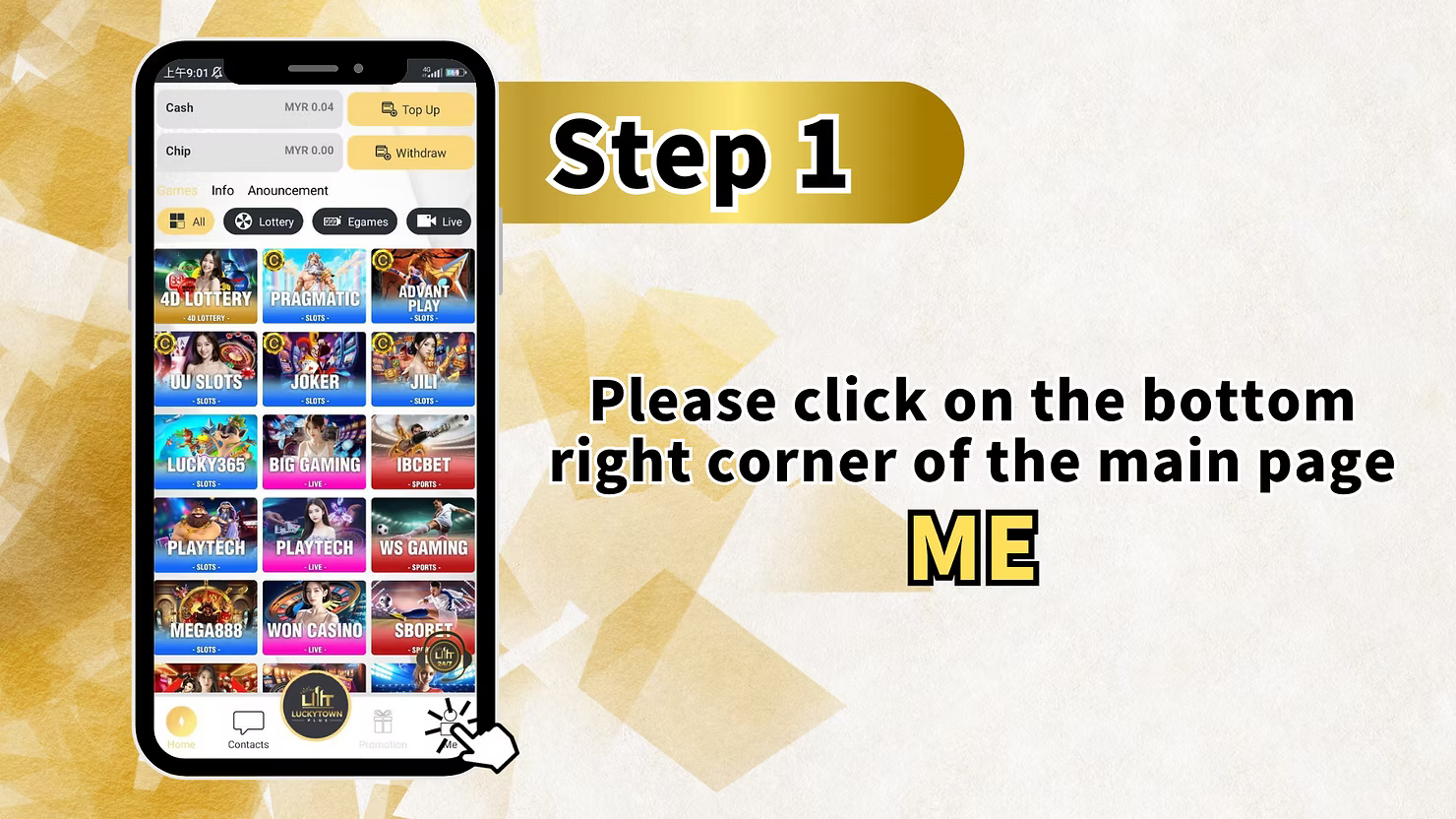
Step 1: Please Click on the Bottom Right Corner of the Main Page ME
To begin your LUCKYTOWN TNG scan QR topup with UPay, navigate to the main page of your LUCKYTOWN PLUS account. Locate and click on the bottom right corner where you will find the "ME" section. This area contains all your account management options including Cash balance, Chip balance, Games, Info, and Announcement sections.
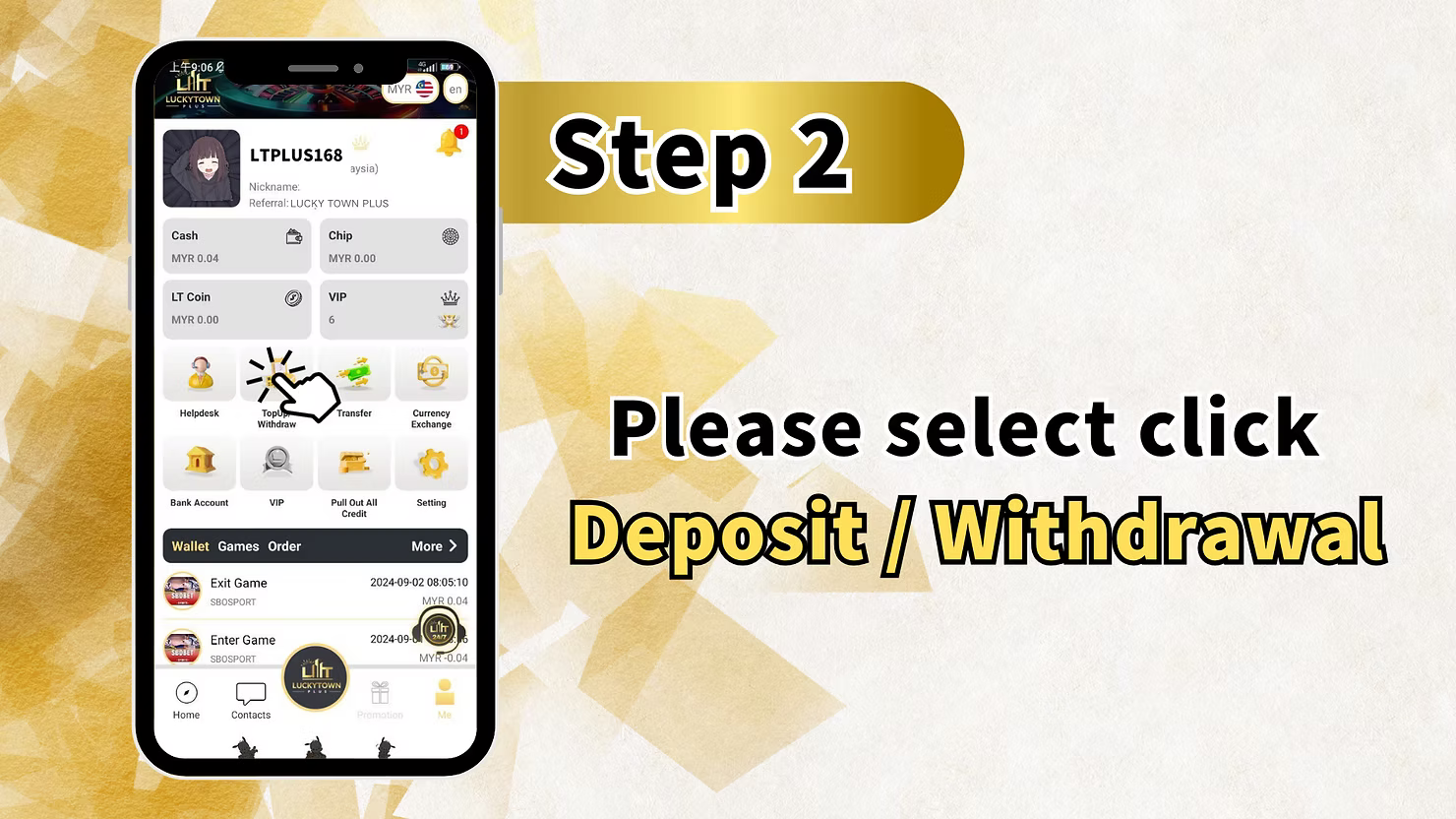
Step 2: Please Select Click Deposit / Withdrawal
After entering the ME section, locate and click on "Deposit / Withdrawal" to proceed with your LUCKYTOWN TNG scan QR topup. This option takes you to the financial transaction center where all deposits and withdrawals are managed for your LUCKYTOWN PLUS account.
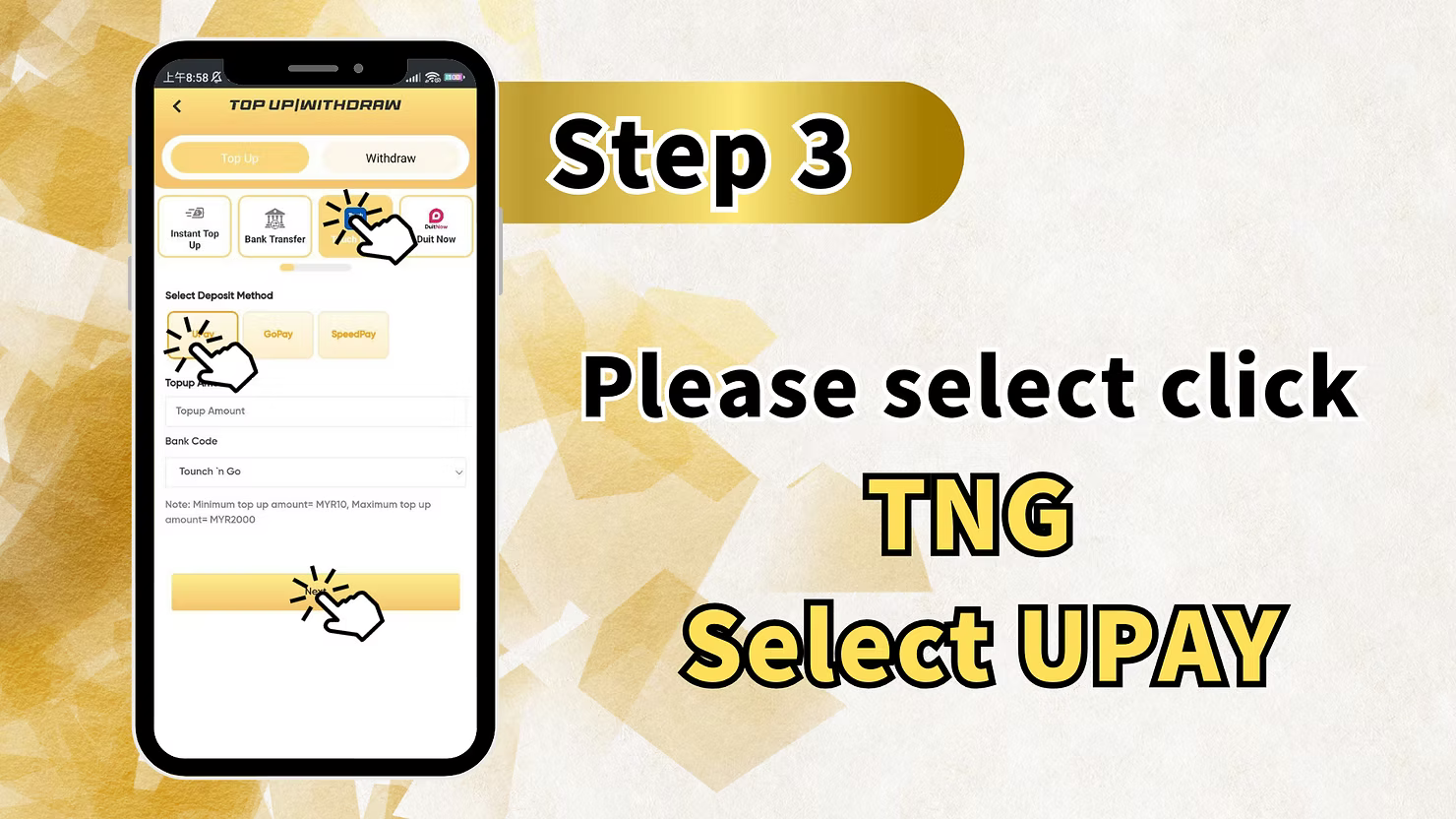
Step 3: Please Select Click TNG Select UPAY
From the available deposit methods, select "TNG" and then choose "UPAY" as your specific payment provider for your LUCKYTOWN TNG scan QR topup. This combination allows you to use UPay's interface while accessing TNG's payment network.
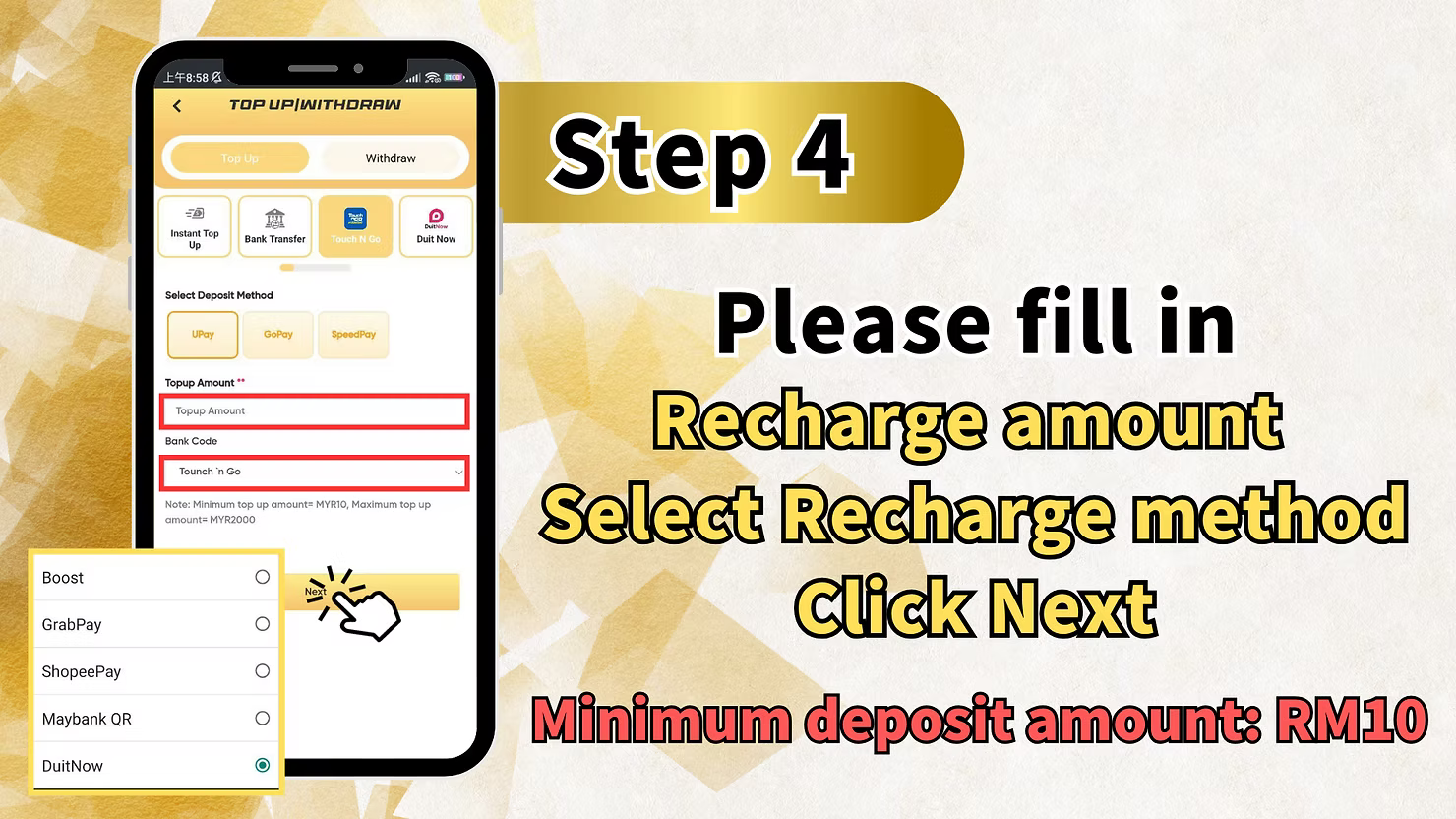
Step 4: Please Fill in Recharge Amount
Enter the amount you wish to deposit for your LUCKYTOWN TNG scan QR topup. Select your preferred recharge method and click Next. The minimum deposit amount for UPay is RM10. Ensure your amount meets or exceeds this minimum before proceeding.
Step 5: QR Code Scan Deposit
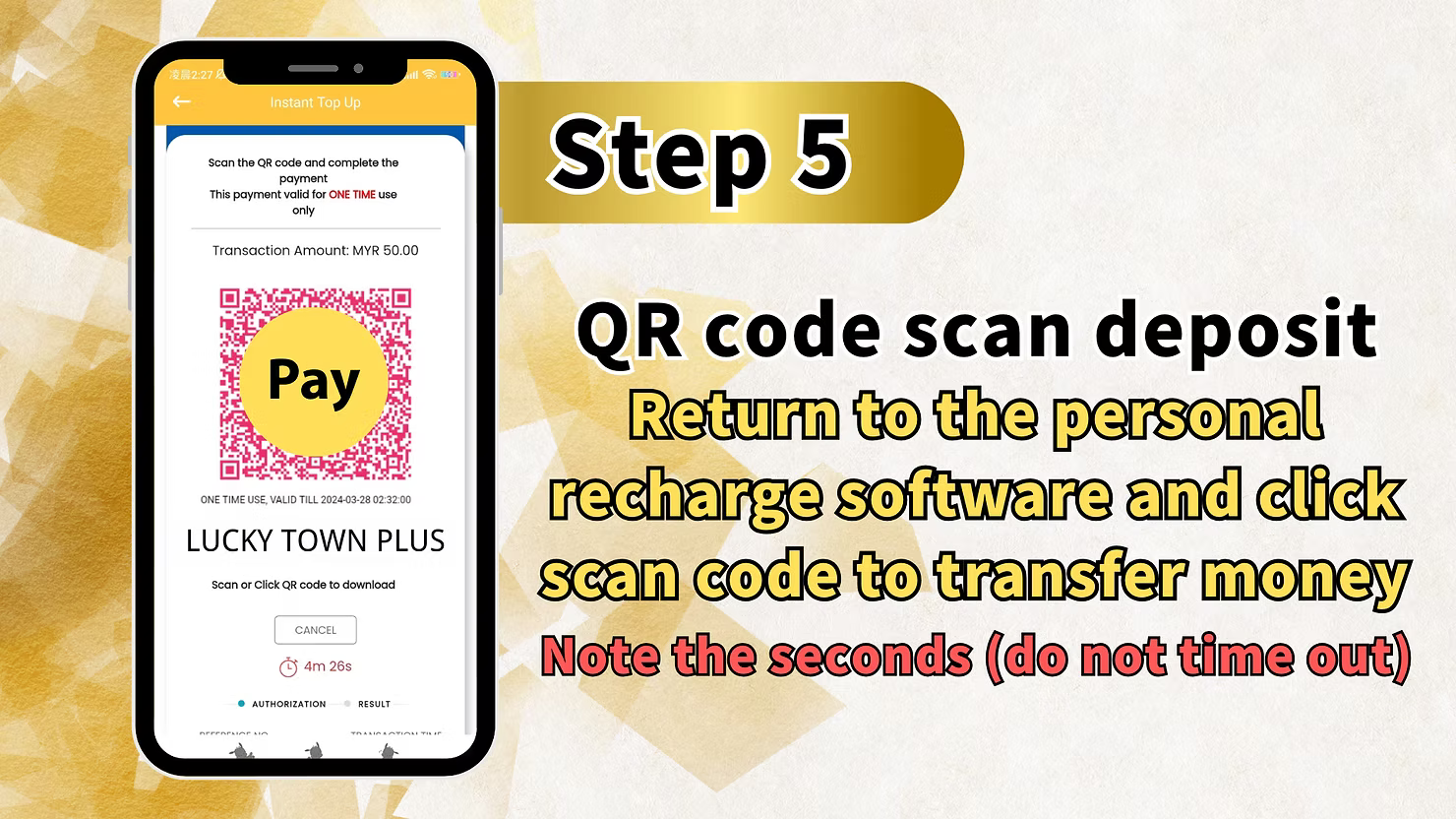
The system will generate a QR code for your LUCKYTOWN TNG scan QR topup. Return to your personal recharge software (UPay app) and click scan code to transfer money. Note the seconds carefully, do not let the transaction time out. Complete the scan and payment before the QR code expires to ensure successful deposit.
Step 6: Return to APP Wait for System Processing
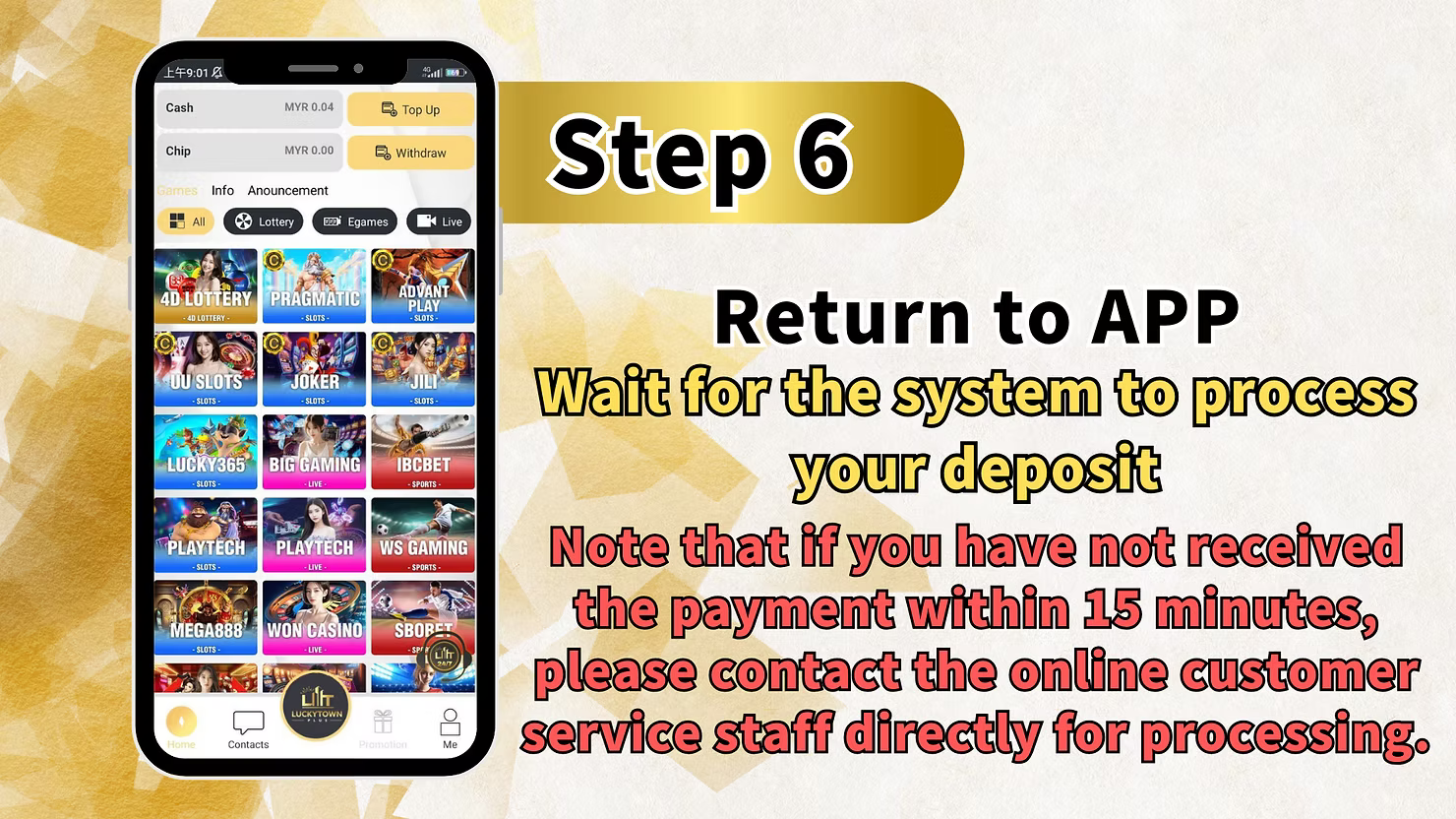
After scanning the QR code and completing payment in your UPay app, return to the LUCKYTOWN app. Wait for the system to process your LUCKYTOWN TNG scan QR topup. Important note: If you have not received confirmation of payment within 15 minutes, please contact the online customer service staff directly for processing.
Touch N Go TNG Scan QR Topup: Step-by-Step Guide

Step 1: Please Click on the Bottom Right Corner of the Main Page ME
To begin your LUCKYTOWN TNG scan QR topup directly with Touch N Go, navigate to the main page of your LUCKYTOWN PLUS account. Locate and click on the bottom right corner where you will find the "ME" section containing all account management options.
Step 2: Please Select Click Deposit / Withdrawal
After entering the ME section, locate and click on "Deposit / Withdrawal" to proceed with your LUCKYTOWN TNG scan QR topup through Touch N Go. This takes you to the financial transaction center.
Step 3: Please Select Click TNG Fill in Recharge Amount Click Next
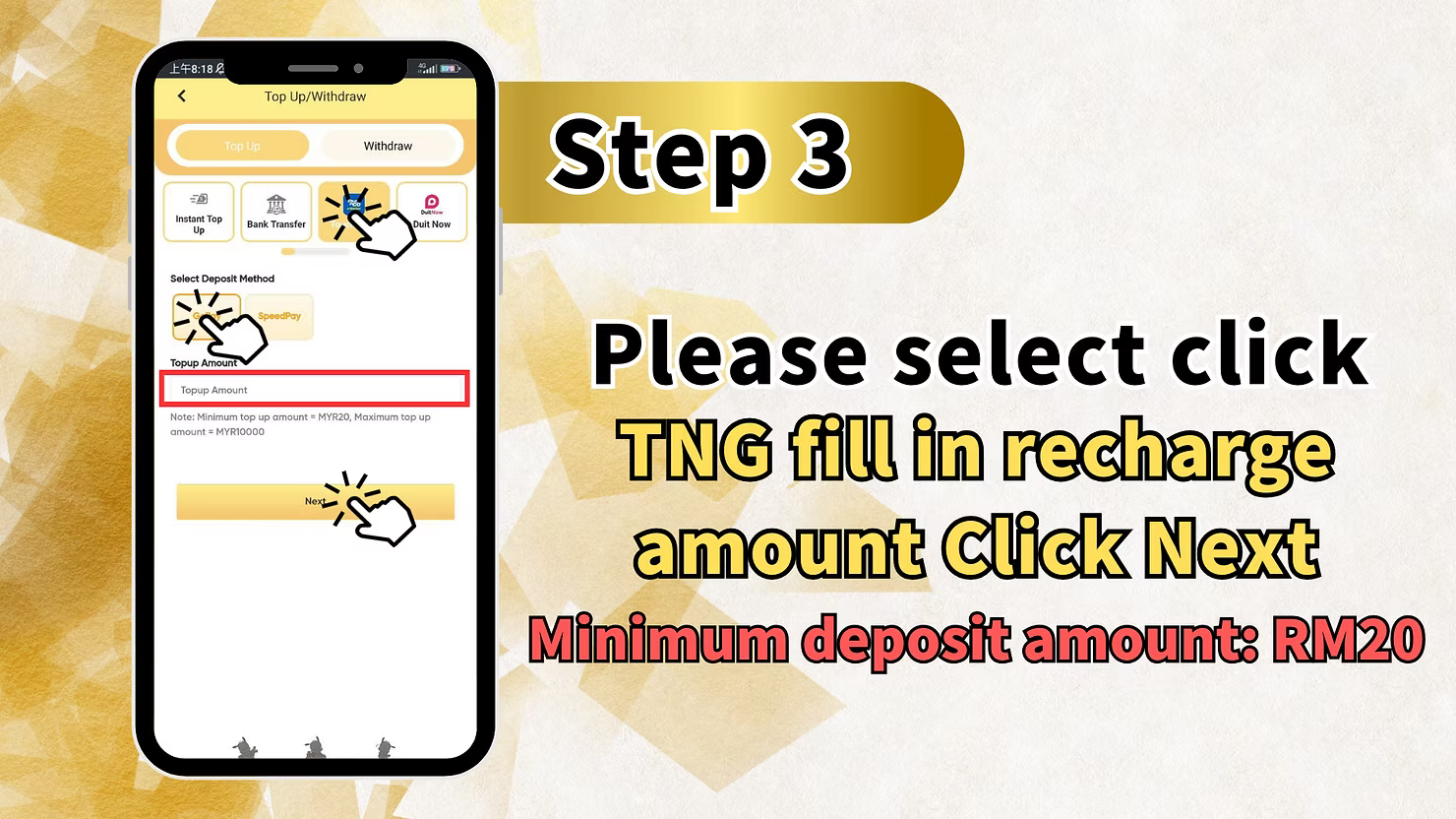
From the available deposit methods, select "TNG". Fill in your recharge amount and click Next. The minimum deposit amount for direct TNG deposits is RM20. Ensure your amount meets or exceeds this minimum before proceeding.
Step 4: Please Fill in Open Trading Account Name Click Submit
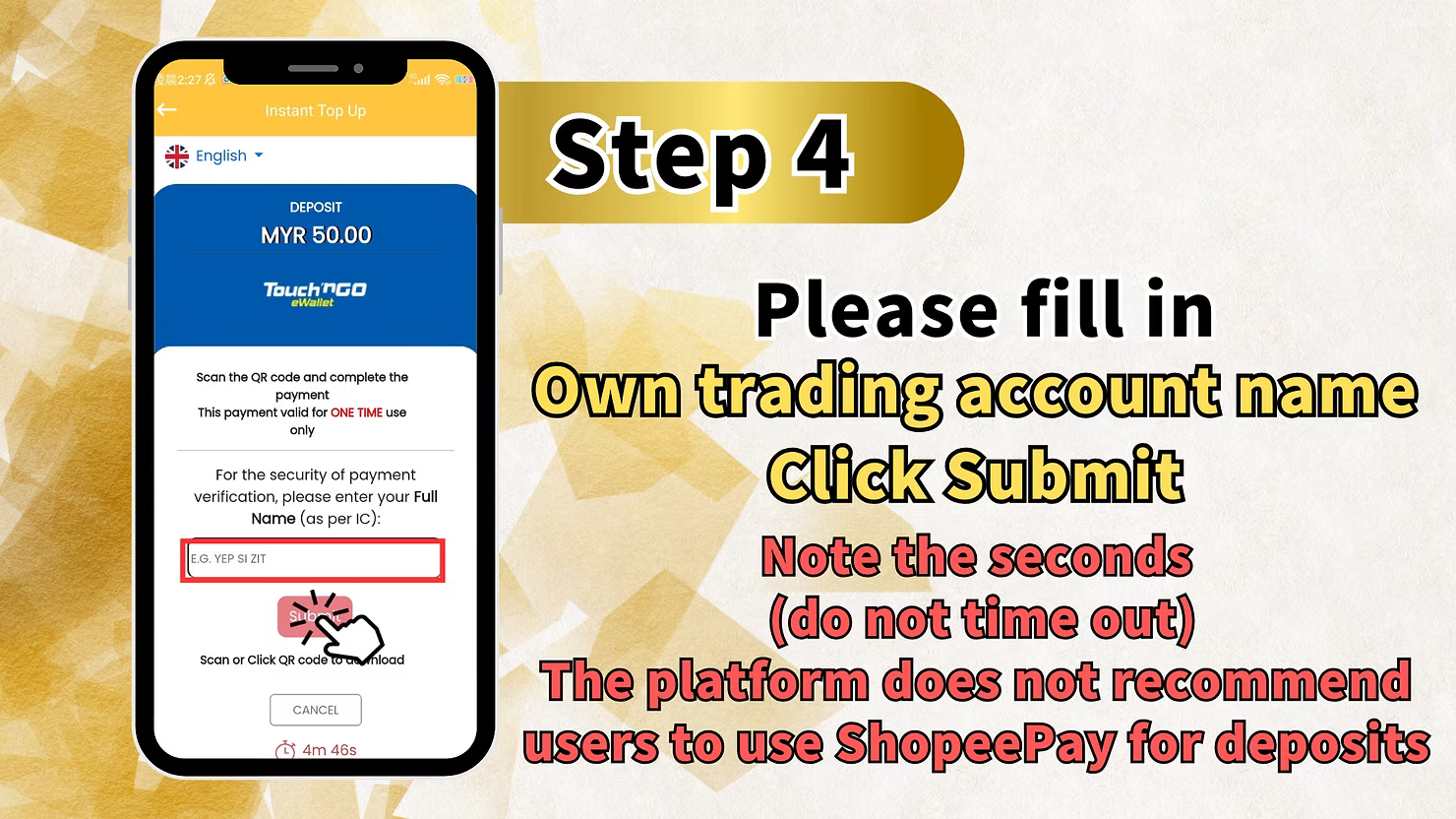
For direct TNG deposits, you may need to fill in your open trading account name and click Submit. Note the seconds carefully, do not let this step time out. Accurate entry ensures proper identification of your LUCKYTOWN TNG scan QR topup.
Step 5: QR Code Scan Deposit
The system will generate a QR code for your LUCKYTOWN TNG scan QR topup. Return to your personal recharge software (TNG app) and click scan code to transfer money. Note the seconds carefully, do not let the transaction time out. Complete the scan and payment promptly.
Step 6: Return to APP Wait for System Processing
After scanning the QR code and completing payment in your TNG app, return to the LUCKYTOWN app. Wait for the system to process your LUCKYTOWN TNG scan QR topup. Important note: If you have not received confirmation of payment within 15 minutes, please contact the online customer service staff directly for processing.
LUCKYTOWN TNG Scan QR Topup Important Guidelines
Minimum Deposit Amounts
LUCKYTOWN TNG scan QR topup offers competitive minimum deposits: UPay minimum is RM10, making it highly accessible. Direct Touch N Go minimum is RM20. Choose the option that best suits your budget and preferred payment app.
QR Code Timeout Warning
When completing LUCKYTOWN TNG scan QR topup, pay close attention to the QR code expiration. Note the seconds displayed on screen and complete your scan before timeout occurs. Expired QR codes require generating a new transaction.
15-Minute Processing Guideline
After scanning and paying, return to the LUCKYTOWN app and wait for system processing. If you have not received payment confirmation within 15 minutes for your LUCKYTOWN TNG scan QR topup, contact online customer service immediately for assistance.
Trading Account Name Requirement
For direct TNG deposits, you must fill in your open trading account name accurately and click Submit before scanning the QR code. This verification step ensures your LUCKYTOWN TNG scan QR topup is properly credited to your account.
Two Provider Options
LUCKYTOWN TNG scan QR topup offers two pathways: UPay with RM10 minimum and direct TNG with RM20 minimum. Both use the same QR code scanning technology but with slightly different minimums and verification steps.
Frequently Asked Questions About LUCKYTOWN TNG Scan QR Topup
What is the minimum deposit for UPay TNG scan QR?
The minimum deposit amount for UPay LUCKYTOWN TNG scan QR topup is RM10. This low minimum makes it extremely accessible for all players to add funds to their LUCKYTOWN PLUS accounts.
What is the minimum deposit for direct TNG scan QR?
The minimum deposit amount for direct Touch N Go LUCKYTOWN TNG scan QR topup is RM20. This standard minimum applies to direct TNG transactions.
How do I start a TNG scan QR topup?
To begin your LUCKYTOWN TNG scan QR topup, click ME at the bottom right of the main page, select Deposit/Withdrawal, then choose TNG and either select UPAY or proceed with direct TNG depending on your preference.
What if my QR code expires before I scan?
If the QR code times out during your LUCKYTOWN TNG scan QR topup, you will need to generate a new transaction. Pay attention to the seconds displayed and complete your scan promptly to avoid timeouts.
How long does processing take after QR scan?
After completing your QR scan and payment, return to the LUCKYTOWN app and wait for system processing. If you haven't received confirmation within 15 minutes for your LUCKYTOWN TNG scan QR topup, contact customer service immediately.
What information do I need for direct TNG deposit?
For direct TNG LUCKYTOWN TNG scan QR topup, you need to fill in your open trading account name and click Submit before scanning the QR code. This verification step ensures proper credit.
Can I use both UPay and TNG for deposits?
Yes. LUCKYTOWN TNG scan QR topup supports both UPay (RM10 minimum) and direct Touch N Go (RM20 minimum). You can choose either method based on which app you prefer to use.
Why Choose LUCKYTOWN TNG Scan QR Topup
Malaysia's Favorite E-Wallet Integration
LUCKYTOWN TNG scan QR topup uses Touch N Go, Malaysia's most popular mobile e-wallet, ensuring familiarity and trust. Millions of Malaysians already use TNG for daily payments, making deposits intuitive and secure.
Ultra-Low Minimum with UPay
With UPay minimum deposits starting at just RM10, LUCKYTOWN TNG scan QR topup offers the most accessible entry point for players who want to start with smaller amounts.
Fast QR Code Processing
The QR code system enables near-instant payment confirmation, with LUCKYTOWN TNG scan QR topup funds typically available shortly after scanning. The 15-minute customer service guarantee provides peace of mind.
Dual Provider Flexibility
Choose between UPay (RM10 minimum) and direct TNG (RM20 minimum) for your LUCKYTOWN TNG scan QR topup based on which app you already use and your preferred deposit amount.
Clear Step-by-Step Instructions
The detailed teaching steps for both UPay and direct TNG ensure even first-time users can complete LUCKYTOWN TNG scan QR topup successfully without confusion or errors.
Additional Content: The LUCKYTOWN TNG scan QR topup feature represents the platform's commitment to providing modern, convenient funding options using Malaysia's most popular e-wallet. Touch N Go has become the country's leading mobile payment solution, used by millions for everything from coffee purchases to bill payments. Integrating TNG QR scanning into LUCKYTOWN PLUS ensures members can deposit using the same trusted app they use daily. The dual-provider approach, offering both UPay integration and direct TNG, gives members flexibility while maintaining the familiar QR scanning experience. UPay's ultra-low RM10 minimum makes LUCKYTOWN accessible to players who prefer to start with smaller deposits, while direct TNG's RM20 minimum aligns with standard industry thresholds. Both options follow a similar intuitive process: start at the ME button, navigate to Deposit/Withdrawal, select TNG, then either choose UPay or proceed with direct TNG, enter your amount, complete any verification steps, scan the generated QR code with your payment app, and return to LUCKYTOWN for processing. The QR code generation screen includes a visible timer reminding you to complete scanning promptly. This attention to timeout prevention helps avoid the frustration of expired codes and transaction restarts. The prominent display of seconds remaining encourages quick action while the transaction is valid. After scanning and confirming payment in your UPay or TNG app, the final step returns you to LUCKYTOWN to await system processing. The 15-minute guideline is crucial: while most deposits process almost instantly, this outer limit tells you exactly when to escalate to customer service if something goes wrong. This transparency reduces anxiety and ensures problems get addressed promptly. For UPay users, the process requires only amount entry before QR scanning, simple and streamlined. For direct TNG users, the additional step of submitting your open trading account name ensures proper identification and prevents miscredited deposits. This extra verification protects both you and LUCKYTOWN. The requirement to "note the seconds (do not time out)" appears multiple times because it's genuinely important. QR codes have limited validity periods, and completing scans within these windows ensures smooth processing. The 15-minute customer service contact instruction demonstrates LUCKYTOWN's commitment to resolving issues quickly. Rather than leaving members wondering whether a deposit will eventually process, the platform sets clear expectations and provides a direct escalation path. This people-first approach reduces frustration and builds trust. For new members completing their first LUCKYTOWN TNG scan QR topup, the teaching steps eliminate guesswork. The progression from ME -> Deposit/Withdrawal -> TNG selection -> amount entry -> verification (for direct TNG) -> QR scan -> return to app -> processing wait is logical and easy to follow. Each step builds naturally on the previous one. For experienced members, the consistent process ensures reliable results every time. The dual availability of UPay and direct TNG means you're not locked into a single provider. If one app has technical issues, you can switch to the other while maintaining the same deposit experience. This redundancy ensures you always have a working deposit method. The low RM10 minimum with UPay is particularly significant. Many platforms require higher minimums, but LUCKYTOWN's commitment to accessibility means players can start with as little as RM10. This lowers the barrier to entry and allows members to familiarize themselves with the platform without committing large amounts upfront. The trading account name verification for direct TNG adds an important security layer. By confirming your identity before QR scanning, LUCKYTOWN ensures that deposits are credited to the correct accounts, preventing misdirected funds. Whether you're depositing RM10 via UPay to try 4D LOTTERY for the first time, RM20 via direct TNG to explore PRAGMATIC slots, or larger amounts to enjoy LIVE CASINO and SPORTS betting, the LUCKYTOWN TNG scan QR topup process handles all amounts efficiently. The QR code system scales seamlessly from minimum to maximum deposits. The combination of Malaysia's favorite e-wallet integration, ultra-low UPay minimums, standard TNG minimums, dual provider flexibility, clear timeout warnings, 15-minute processing guarantee, and direct customer service escalation makes LUCKYTOWN TNG scan QR topup one of the most user-friendly deposit methods available to Malaysian players. Follow the steps for your chosen provider, UPay for RM10 minimum or direct TNG for RM20 minimum, scan the QR code with your TNG or UPay app, and enjoy fast crediting to your LUCKYTOWN PLUS account.
Complete Your LUCKYTOWN TNG Scan QR Topup Today
Use UPay (RM10 minimum) or direct Touch N Go (RM20 minimum) for fast QR code deposits. Follow our step-by-step teaching guide, scan with your TNG app, and receive processing within 15 minutes. LUCKYTOWN PLUS makes depositing simple.
Start TNG Scan QR Topup Now