
Duit Now Top Up on LUCKYTOWN: Complete Guide for UPay & Go Pay
LUCKYTOWN Duit Now Top Up -Fast and Convenient Digital Payments

LUCKYTOWN offers Duit Now as a quick and secure deposit method for Malaysian players. Duit Now enables instant fund transfers directly from your bank account or e-wallet. LUCKYTOWN provides two Duit Now options: UPay Duit Now and Go Pay Duit Now. Choose the method that works best for you and follow our step-by-step guides below.
Method 1: UPay Duit Now - Complete Step-by-Step Guide

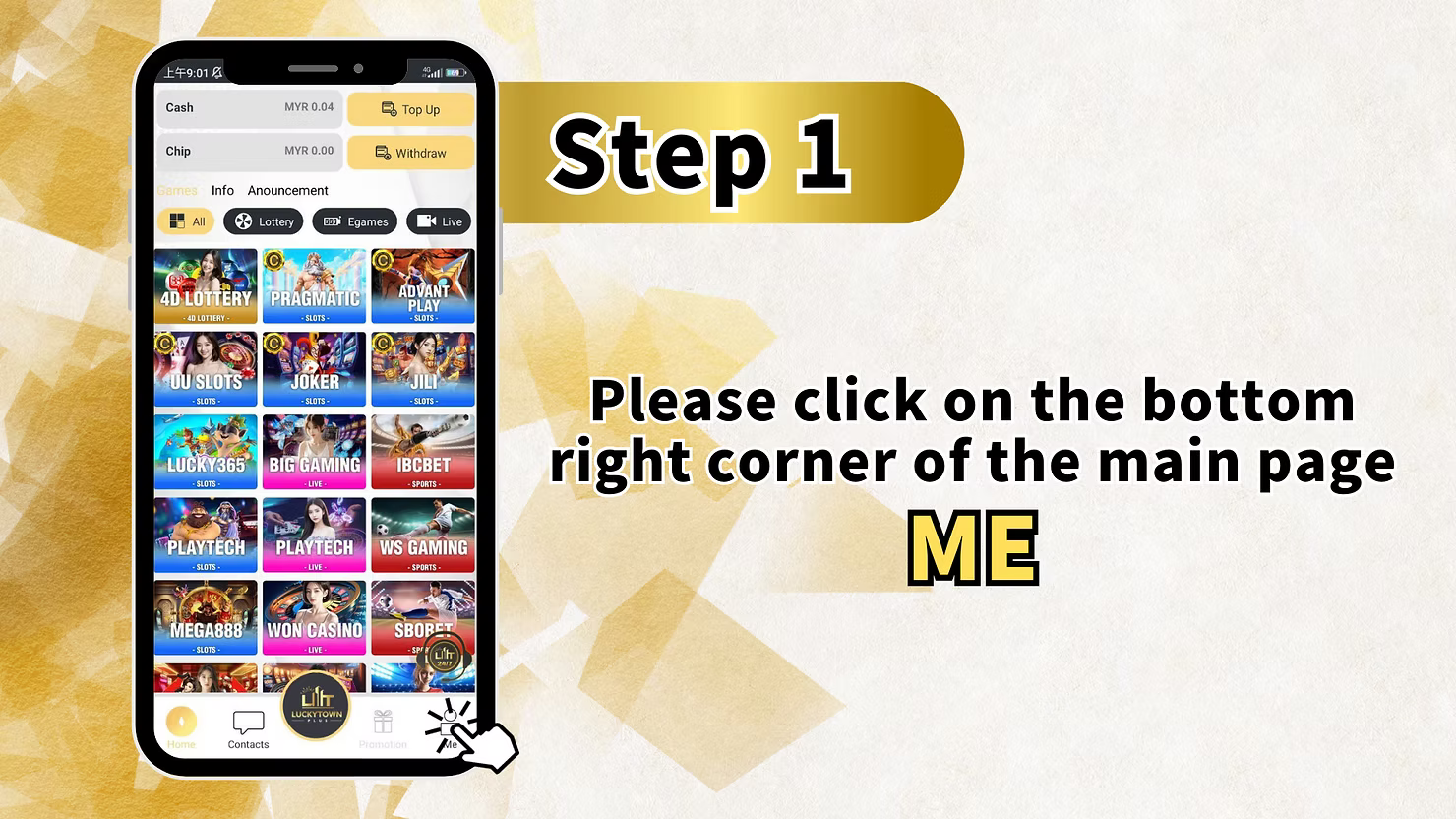
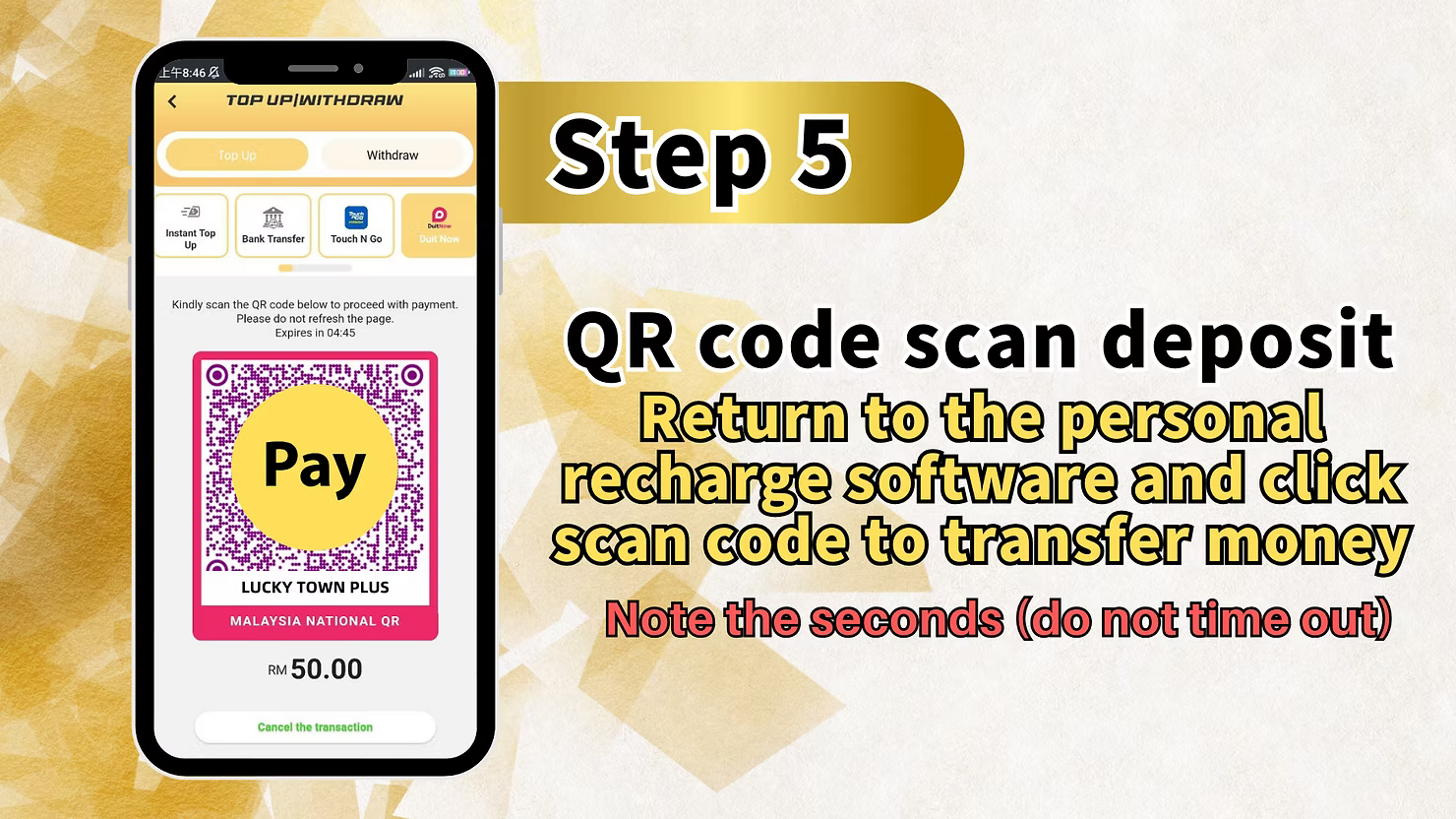
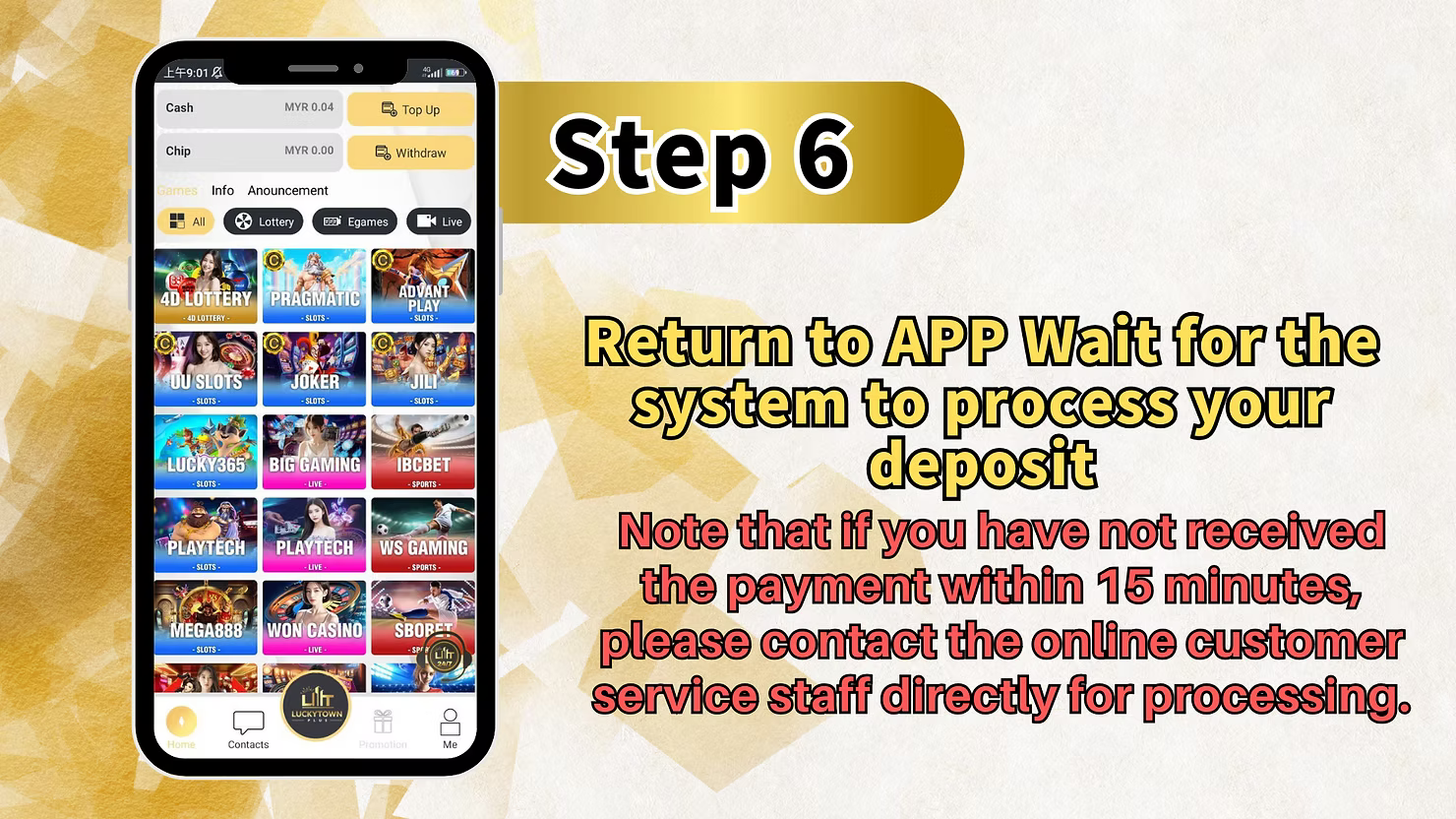
Step 1: Access the "UPT" Section
Log in to your LUCKYTOWN account. On the main page, locate and click the "UPT" button in the bottom right corner. This opens the UPay payment interface.
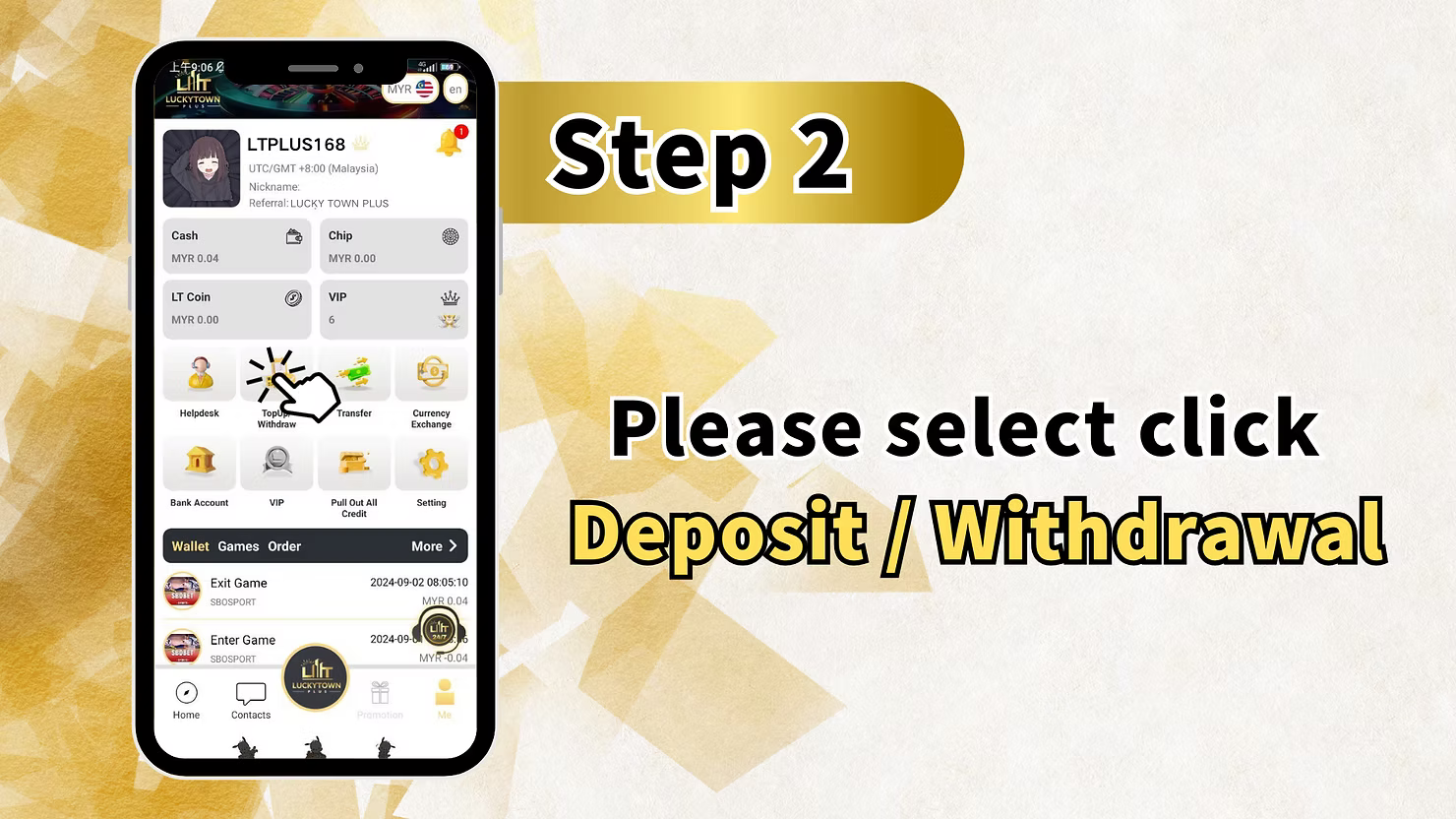
Step 2: Select "Deposit / Withdrawal"
From the UPay menu, select "Deposit / Withdrawal" to access the payment options.
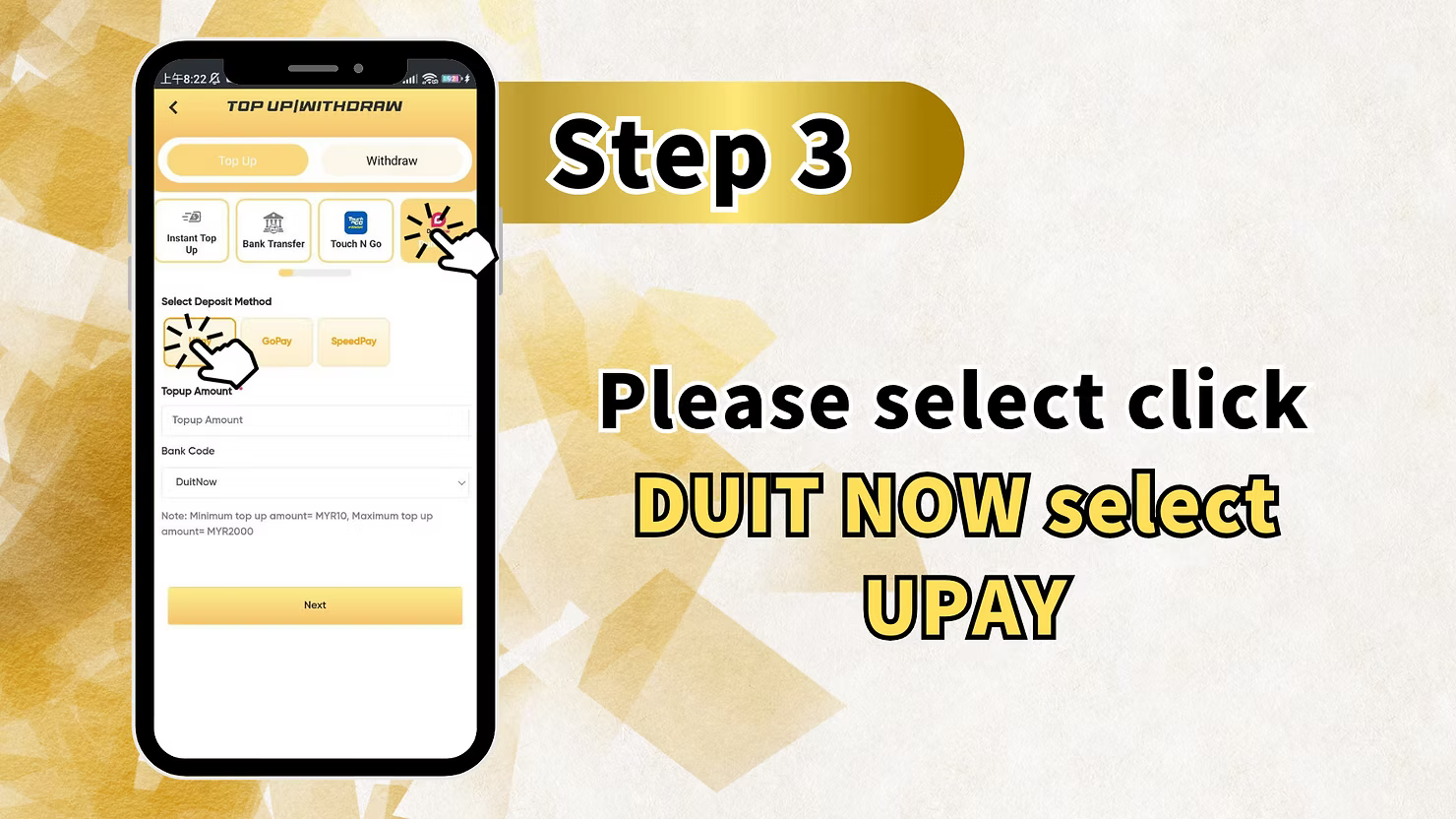
Step 3: Click "BUY NOW" and Select "UP PAY"
On the deposit page, click the "BUY NOW" button. From the available payment methods, select "UP PAY" as your deposit option.
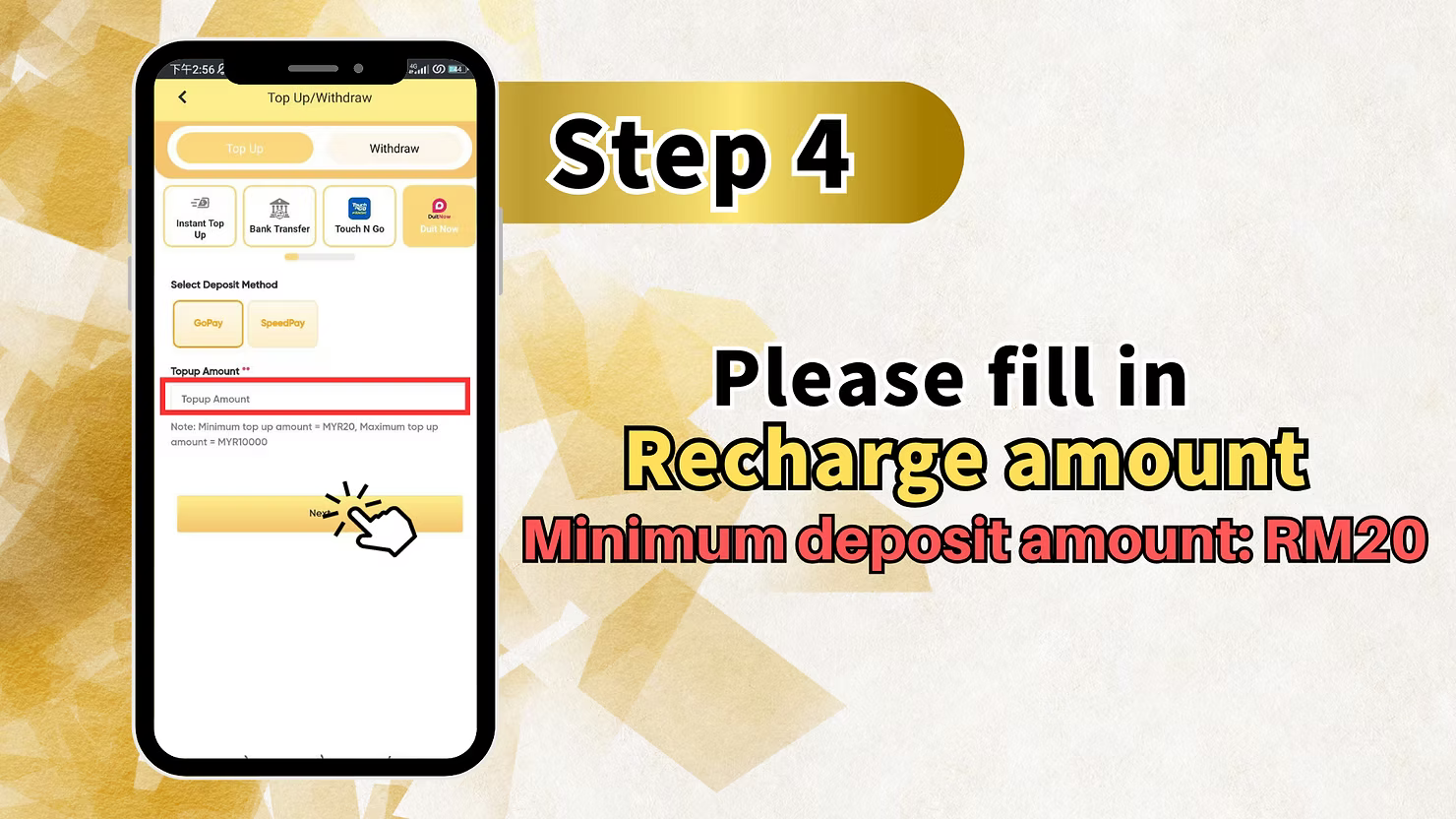
Step 4: Enter Recharge Amount and Select Method
Fill in the recharge amount you wish to deposit. Then select your preferred recharge method.
Important Note About Timeout
"Note: The second (do not time out) deposit amount RM10." This indicates that the minimum deposit amount is RM10, and you should complete the transaction promptly to avoid timeout issues.
Step 5: Complete Payment via UPay
Follow the UPay payment instructions to complete your transfer. The exact steps may vary depending on your UPay app or interface.
Step 6: Wait for Processing
After completing your payment, return to the LUCKYTOWN app and wait for the system to process your deposit.
Processing Time and Support
"Note that if you have not received the payment within 15 minutes, please contact the online customer service staff directly for processing." If your deposit isn't credited within 15 minutes, contact customer support immediately.
Method 2: Go Pay Duit Now - Complete Step-by-Step Guide

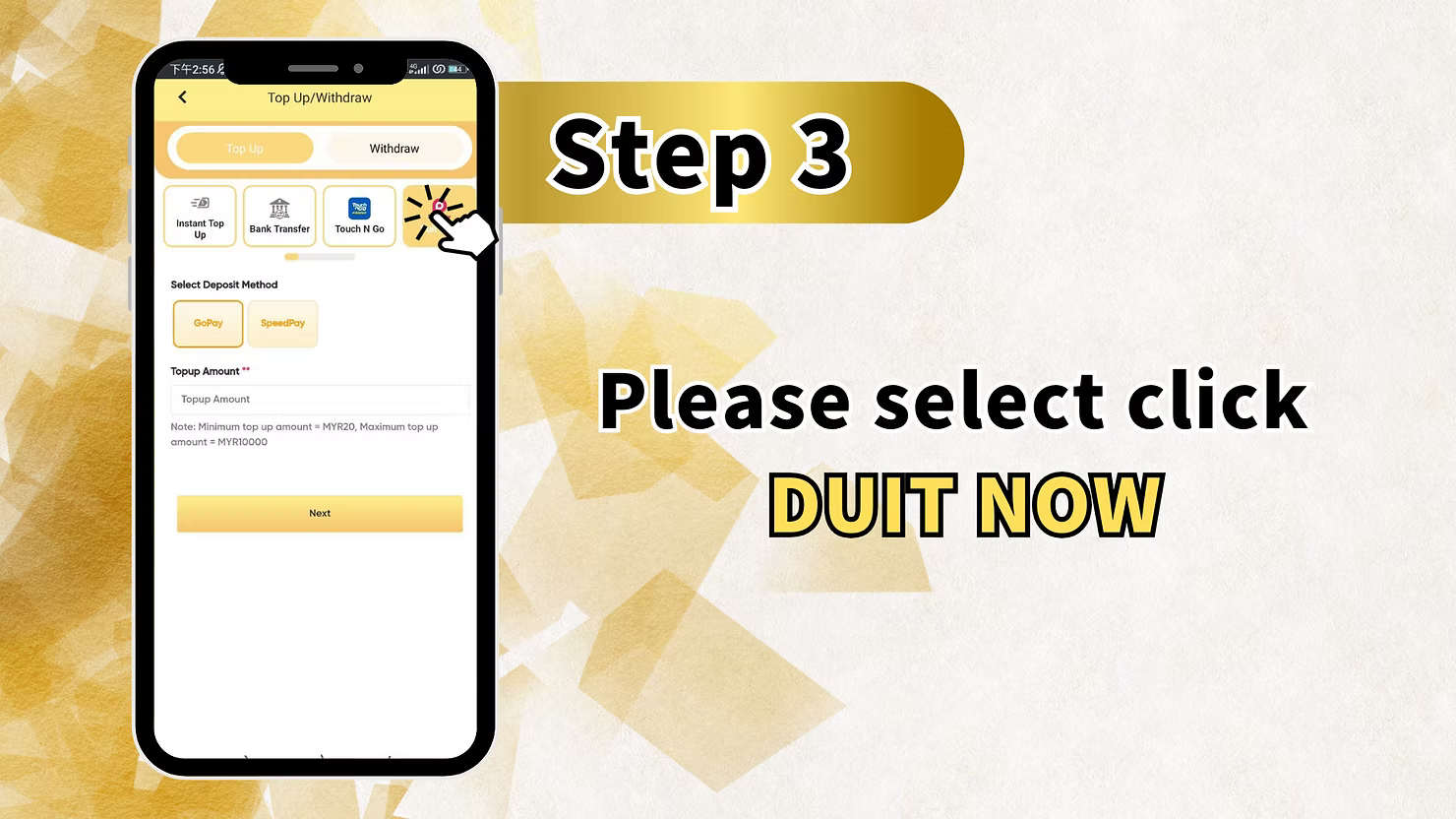
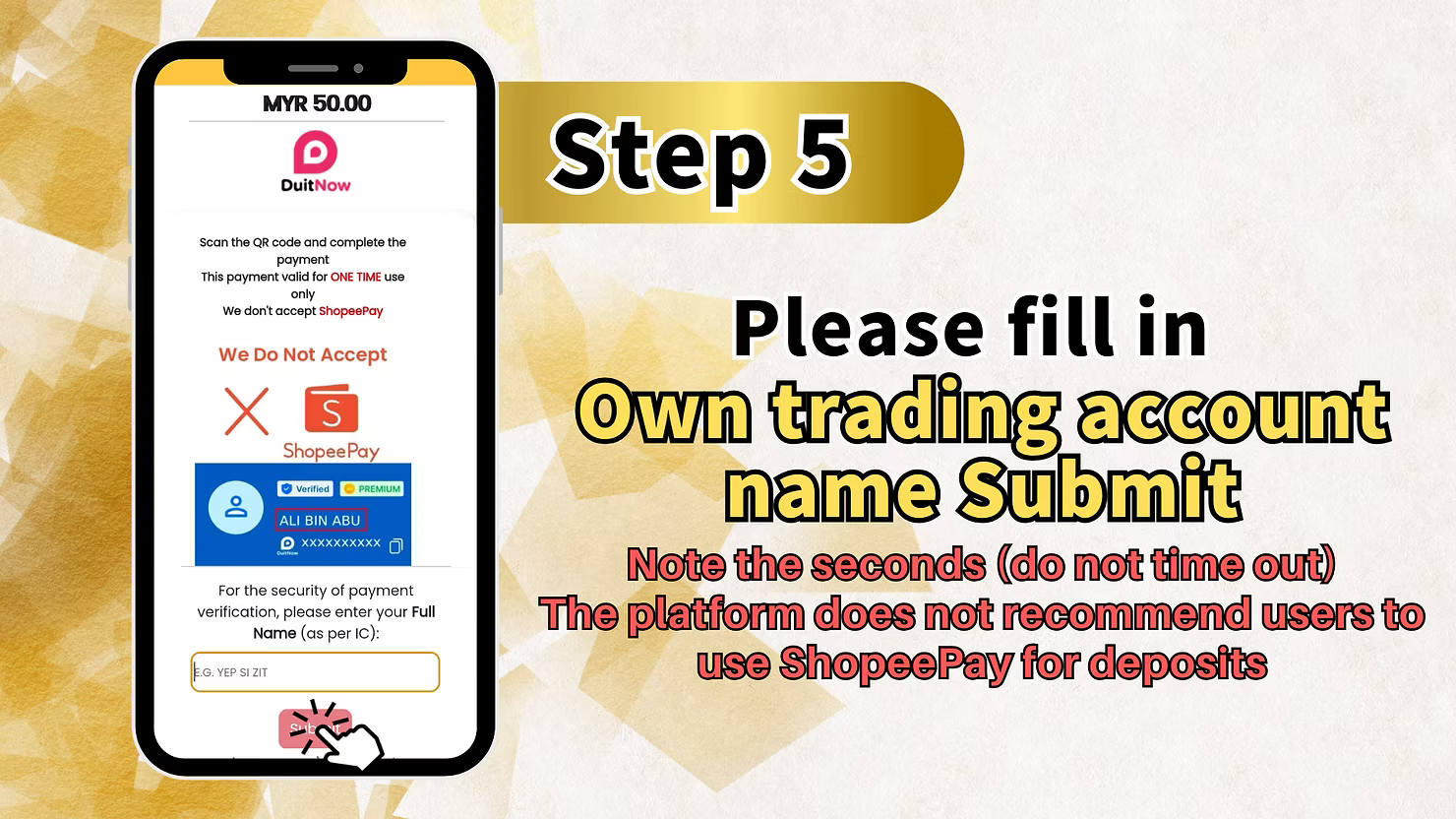
Step 1: Access the "Me" Section
Log in to your LUCKYTOWN account. On the main page, locate and click the "Me" button in the bottom right corner to access your personal dashboard.
Step 2: Select "Deposit / Withdrawal"
From your dashboard, click on "Deposit / Withdrawal" to access the financial transaction page.
Step 3: Click "DEPOSIT DOWN"
On the deposit page, click the "DEPOSIT DOWN" button to proceed with your deposit.
Step 4: Enter Receipts Amount
Fill in the receipts amount, this is the amount you wish to deposit. Enter the amount carefully to ensure accuracy.
Step 5: Fill in Open Trading Account Name (Strictly)
Strictly enter your open trading account name. This should match the name registered on your LUCKYTOWN account.
Name Matching Requirement
The name you enter must match your account registration exactly. Any discrepancy may cause delays or rejection of your deposit.
Step 6: QR Code Scan Deposit
For this step, you will use QR code scanning to complete your deposit.
Important QR Code Notice
"Note: The platform does not recommend using this method to deposit funds." This is an important warning, while QR code deposit is available, LUCKYTOWN does not recommend it as the primary deposit method. Consider using other methods if possible.
How to Complete QR Deposit
"Enter the QR code and deposit." Scan the provided QR code using your Duit Now-enabled banking app or e-wallet, then complete the payment.
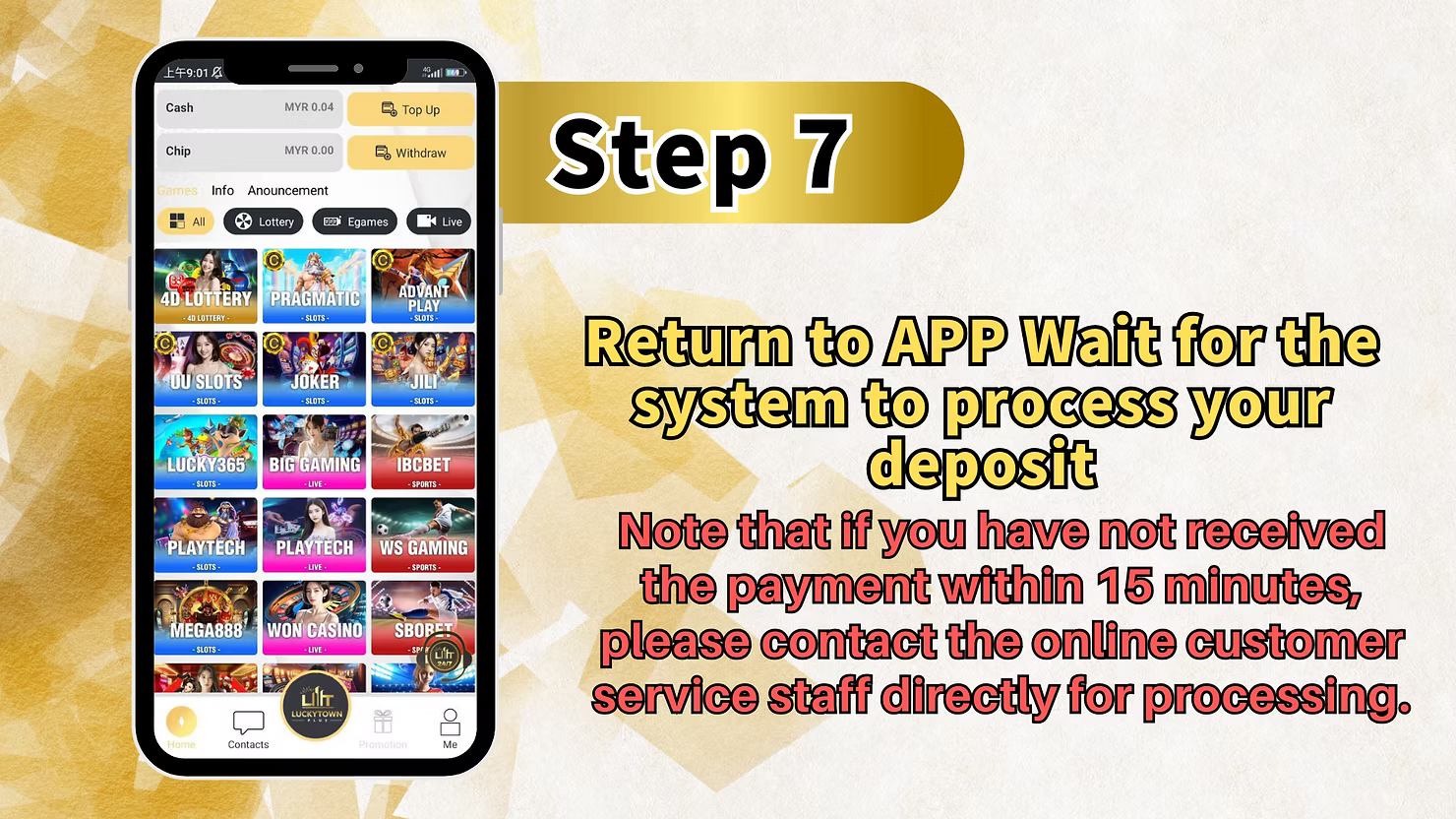
Step 7: Wait for Processing
After completing your QR code payment, return to the LUCKYTOWN app and wait for the transaction to process.
Processing Time and Support
"Note: If you have not received your withdrawal confirmation within 15 minutes, please contact the online customer service staff directly for processing." If your deposit isn't credited within 15 minutes, contact customer support for assistance.
Important Notes for Duit Now Top Up
Minimum Deposit Amount
The minimum deposit amount for Duit Now transactions is RM10. This applies to both UPay and Go Pay methods.
Processing Time
Duit Now deposits are typically processed quickly. However, if your funds are not credited within 15 minutes, you should contact LUCKYTOWN customer service immediately for assistance.
Name Matching Requirement
For Go Pay Duit Now, you must strictly enter your trading account name exactly as registered. For all deposit methods, the name on your payment account should match your LUCKYTOWN registration.
QR Code Deposit Recommendation
Note that LUCKYTOWN does not recommend using QR code deposit for Go Pay Duit Now. Consider using alternative deposit methods such as bank transfer or TNG for a smoother experience.
Frequently Asked Questions About Duit Now Top Up
What Is Duit Now?
Duit Now is Malaysia's real-time payment platform that enables instant fund transfers between participating banks and e-wallets. It allows for quick deposits using QR codes or direct transfers.
Which Duit Now Method Should I Choose?
LUCKYTOWN offers two Duit Now options:
- UPay Duit Now - Recommended method with straightforward steps
- Go Pay Duit Now - Available but QR code method is not recommended by the platform
What Is the Minimum Deposit for Duit Now?
The minimum deposit amount for Duit Now transactions on LUCKYTOWN is RM10.
How Long Does a Duit Now Deposit Take?
Most Duit Now deposits are processed within minutes. If your deposit is not credited within 15 minutes, please contact customer service.
What If My Deposit Doesn't Arrive After 15 Minutes?
If you have not received your deposit confirmation within 15 minutes, contact LUCKYTOWN online customer service directly. Have your transaction details ready for faster assistance.
Is QR Code Deposit Safe?
While QR code deposits use secure technology, LUCKYTOWN notes that this method is not recommended. For optimal security and reliability, consider using UPay Duit Now or other deposit methods like bank transfer or TNG.
Do I Need to Verify My Account Before Depositing?
You can deposit without completing Real Name Verification, but verified accounts have higher limits and smoother withdrawal processes. It's recommended to complete verification early.
Why Choose Duit Now Top Up on LUCKYTOWN?
Duit Now offers Malaysian players a fast, real-time deposit option directly from participating banks and e-wallets. With a low minimum deposit of just RM10, it's accessible for all players. LUCKYTOWN provides clear step-by-step instructions for both UPay and Go Pay methods, ensuring you can complete your deposit quickly. While the QR code method carries a platform recommendation against it, the UPay Duit Now option provides a reliable alternative. LUCKYTOWN is committed to offering diverse payment options to suit every player's preference.
Top Up Now with Duit Now on LUCKYTOWN
Ready to add funds using Duit Now? Choose between UPay Duit Now or Go Pay Duit Now and follow our step-by-step guides. Minimum deposit just RM10, with processing in as little as 15 minutes. Log in now to start your top up, or sign up in minutes using your Malaysia phone number.
Start Duit Now Top Up